

On this page
- What is the official WhatsApp Plus?
- WhatsApp Plus price by country
- What you get: the 6 WhatsApp Plus features
- How to subscribe to WhatsApp Plus
- How to cancel WhatsApp Plus
- What the official WhatsApp Plus does NOT include
- Is the official WhatsApp Plus worth it?
- Availability and rollout
- Frequently asked questions about the official WhatsApp Plus
- Sources
For years, “WhatsApp Plus” was the name of an unofficial blue mod that you had to install from an APK file. Since May 2026, the same name also belongs to something completely different: an official, optional subscription from Meta that you activate inside the regular WhatsApp app from Google Play or the App Store.
That has created a lot of confusion. People search for “official WhatsApp Plus” and land on mod download pages, or they subscribe expecting anti-delete and hidden blue ticks and are surprised when those features never appear. This guide explains exactly what Meta's WhatsApp Plus is, what it costs in different countries, what you get for the money, how to subscribe and cancel, and how it compares with the WhatsApp Plus APK.
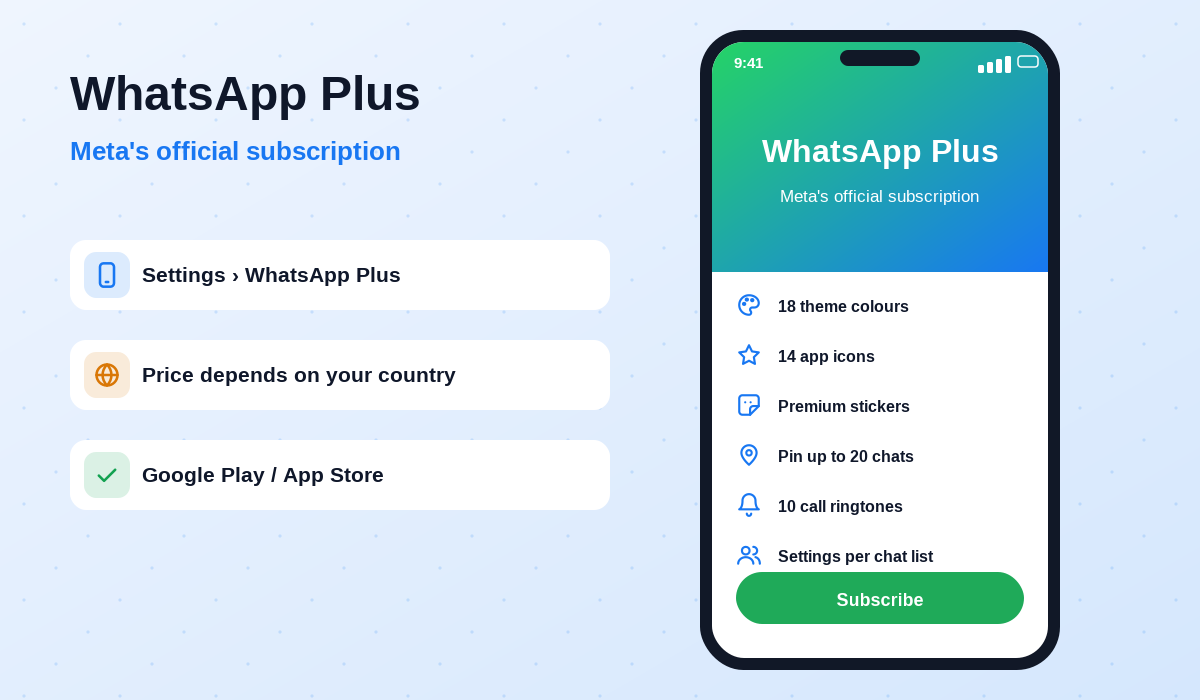
Meta's WhatsApp Plus is an official paid add-on inside the normal WhatsApp app and carries no ban risk. The WhatsApp Plus APK is an unofficial mod made by independent developers, is free, and can get your number banned. This page is about the official subscription.
What is the official WhatsApp Plus?
WhatsApp Plus is a monthly subscription that Meta launched globally on May 27, 2026, at the same time as Instagram Plus and Facebook Plus. Meta presented the three plans as optional extras for people who want more ways to personalise the apps, and said more subscription plans, including AI plans, would follow.
The subscription did not appear out of nowhere. It was first tested in the WhatsApp beta for Android in April 2026, then reached beta testers on iOS, and only afterwards started rolling out to regular users. Because the rollout is gradual, some accounts saw it within days while others are still waiting.
The key point is that WhatsApp itself stays free. Sending messages, making calls, joining groups and using the app's normal privacy settings cost nothing, with or without the subscription. WhatsApp Plus only adds a layer of personalisation on top: more colours, more icons, better stickers and ringtones, and a larger number of pinned chats.
WhatsApp Plus price by country
Meta sets a local price for each market, so the amount you see depends on where your Google Play or App Store account is registered. These are the prices seen in 2026:
| Country or region | Monthly price | Notes |
|---|---|---|
| United States | US$2.99 | Billed monthly through Google Play or the App Store |
| Europe | €2.49 | Price shown in euros in eurozone countries |
| Pakistan | PKR 229 | Local pricing |
| Mexico | MX$29 | Local pricing |
| Other countries | Local price shown in the app | Check the amount on the subscription screen before confirming |
Some accounts are offered a free trial before the first payment. The subscription renews automatically every month until you cancel it, and the charge goes through the same store account you use for other apps. Prices can change over time, so always trust the figure shown on the subscription screen rather than any list online, including this one.
What you get: the 6 WhatsApp Plus features
Meta's WhatsApp Plus focuses on appearance and organisation. At launch, subscribers get six extras:
More accent and chat colours on top of the palette that every WhatsApp user already has for free.
Change how the WhatsApp icon looks on your home screen, choosing from 14 different designs.
Exclusive animated sticker packs that you can send to anyone, including contacts without the subscription.
Keep up to 20 conversations at the top of your chat list instead of the standard limit of 3.
Extra ringtones for calls, so you can tell at a glance who or which group is ringing.
Apply a theme, notification settings and a ringtone to an entire chat list at once instead of chat by chat.
The last feature is more useful than it sounds. If you organise chats into lists such as Family, Work or Clubs, you can give each list its own colour, notification behaviour and ringtone in a single step. For people who manage dozens of active chats, that saves a lot of tapping, and the extra pinned slots make the most important conversations easy to find.
How to subscribe to WhatsApp Plus
There is nothing to download from a website. The subscription lives inside the official app, so the process is the same on Android and iPhone:
- 1Update WhatsApp
Update WhatsApp to the latest version from Google Play or the App Store. Older versions do not show the subscription.
- 2Open Settings
Open WhatsApp and go to Settings. On Android, tap the three-dot menu first; on iPhone, tap the Settings tab.
- 3Look for WhatsApp Plus
If the subscription is available for your account, you will see a WhatsApp Plus entry or banner in Settings. If it is not there, it has not reached your account yet.
- 4Check the price and trial
Open the WhatsApp Plus screen and read the monthly price for your country and whether a free trial is offered.
- 5Confirm the payment
Tap subscribe and confirm with Google Play or the App Store, using your usual payment method.
- 6Customise the app
Once active, choose your theme colour, app icon, ringtones and pinned chats from the WhatsApp Plus settings.
The official subscription is only sold inside WhatsApp and charged through Google Play or the App Store. Any website, message or APK that asks for your card details to “activate WhatsApp Plus” is a scam. Our WhatsApp safety guide explains how to spot this kind of trick.
How to cancel WhatsApp Plus
Because billing is handled by the app stores, you cancel the subscription there, not in a chat or on a website:
- Android: open Google Play, tap your profile picture, go to Payments and subscriptions → Subscriptions, select WhatsApp and tap Cancel subscription.
- iPhone: open the Settings app, tap your name, go to Subscriptions, select WhatsApp and tap Cancel Subscription.
- Store subscriptions normally stay active until the end of the period you have already paid for, after which the premium extras are removed.
- Your chats, media and backups are not affected: cancelling only removes the cosmetic extras.
What the official WhatsApp Plus does NOT include
This is where most of the confusion comes from. Meta's subscription does not turn WhatsApp into a mod. It does not change how messages are delivered, it does not add anti-delete, and it does not let you hide blue ticks or your online status beyond what WhatsApp's normal privacy settings already allow for every user. The table compares it with the WhatsApp Plus mod:
| Feature | Official WhatsApp Plus (Meta) | WhatsApp Plus mod (APK) |
|---|---|---|
| Extra themes | ✔ 18 extra theme colours | ✔ Theme store and full colour editing |
| Alternative app icons | ✔ 14 icons | ✔ Several icons, depending on the build |
| Pinned chats | ✔ Up to 20 | ✔ More than 3 in most builds |
| Premium stickers and ringtones | ✔ | ✘ (custom files only) |
| Anti-delete messages | ✘ | ✔ |
| Hide online or blue ticks beyond normal settings | ✘ | ✔ |
| Download statuses | ✘ | ✔ |
| Ban risk | ✘ None | ✔ Temporary or permanent bans possible |
| Price | Monthly subscription | Free |
| Source | Google Play / App Store | APK from third-party sites |
| Updates | Automatic through the store | Manual APK updates |
| Google Drive / iCloud backups | ✔ | ✘ Local backups only in most builds |
| Support from Meta | ✔ | ✘ |
In short, the official subscription is about looks and convenience with zero risk to your account, while the mod is about extra privacy and control at the cost of a real ban risk. If you want something in between, some people keep official WhatsApp on their main phone and use a mod as a companion device; we explain that approach in our WhatsApp Plus linked mode guide, and you can compare the active mods in our WhatsApp mods comparison.
Is the official WhatsApp Plus worth it?
It depends on what you expect. If you are happy with WhatsApp and simply want it to look more personal, with more pinned chats and nicer ringtones, the price is modest and there is no downside for your account. If you were hoping for mod-style privacy tricks, you will be disappointed, because none of them are included.
- Official and carries no ban risk
- Works inside the normal app, with automatic updates
- Keeps Google Drive or iCloud backups working
- Up to 20 pinned chats is genuinely useful for busy users
- Chat list settings save time
- Can be cancelled at any time from the store
- Mainly cosmetic: no new messaging or privacy features
- Monthly cost adds up over a year
- Rolling out gradually, so not everyone can subscribe yet
- Free WhatsApp already has 38 chat theme colours
- Premium extras disappear when you cancel
Our view: try the free trial if your account is offered one, and keep the subscription only if you actually use the extra pinned chats, icons and chat list settings. If what you really want is anti-delete or hidden ticks, read our honest guide to WhatsApp mod safety before deciding whether that trade-off is acceptable for you.
Availability and rollout
Meta is enabling WhatsApp Plus gradually, account by account and country by country. That is why two people in the same house can see different things: one has the WhatsApp Plus entry in Settings, the other does not. There is no trick to force it and no special APK that unlocks it; the only step you control is keeping WhatsApp updated from the official store.
While you wait, remember how much the free app already does in 2026: usernames, two accounts in one app, on-device message translation, 38 chat theme colours, voice chats in all groups, threaded replies, chat lock and detailed privacy settings. For many people, those free features are enough, and the subscription is just a nice extra.
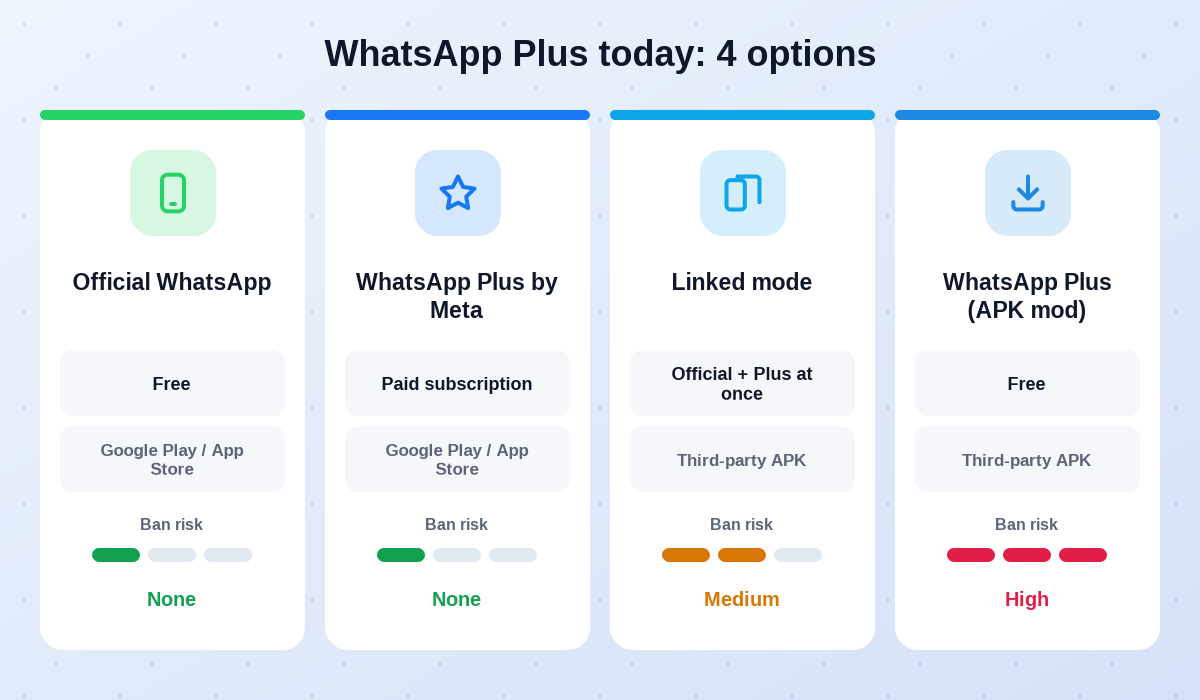
If a website claims to offer an “official WhatsApp Plus APK” or a “WhatsApp Plus Meta download”, be careful. Meta's subscription is never distributed as a separate file. Anything sold that way is either the unofficial mod under a misleading label or, worse, malware.
Frequently asked questions about the official WhatsApp Plus
Is WhatsApp Plus from Meta official?
How much does the official WhatsApp Plus cost?
Why don't I see WhatsApp Plus in my settings?
Does the official WhatsApp Plus have anti-delete or hide blue ticks?
Can I get banned for using Meta's WhatsApp Plus?
Will I lose my chats if I cancel?
Is the official WhatsApp Plus the same as the WhatsApp Plus APK?
Sources
The facts on this page are based on Meta's launch announcement as reported by TechCrunch, the pricing and feature details published by 9to5Mac, and the beta testing coverage from WABetaInfo. Prices and availability were checked in 2026 and may change.
 WhatsApp PlusActive v18.80The complete guide to WhatsApp Plus APK: latest version download, features, installation, updates, safety, backups and fixes for common problems.View and download →
 WhatsApp Plus LinkedHow WhatsApp Plus linked mode works, how it compares with an unlinked install, step-by-step setup, the 14-day rule, honest ban risk and the latest builds we have checked.Read guide →
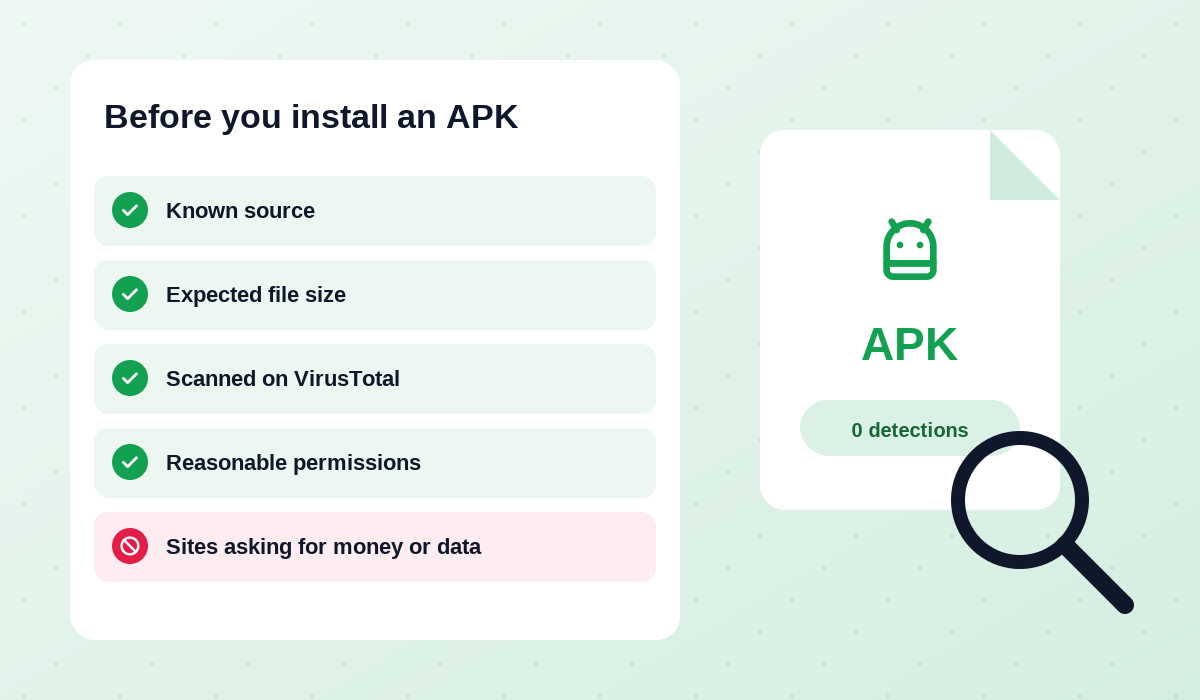 Is It Safe?An honest look at the risks of WhatsApp Plus, GBWhatsApp and discontinued mods like FMWhatsApp, how to check an APK and what to do after a ban.Read guide →
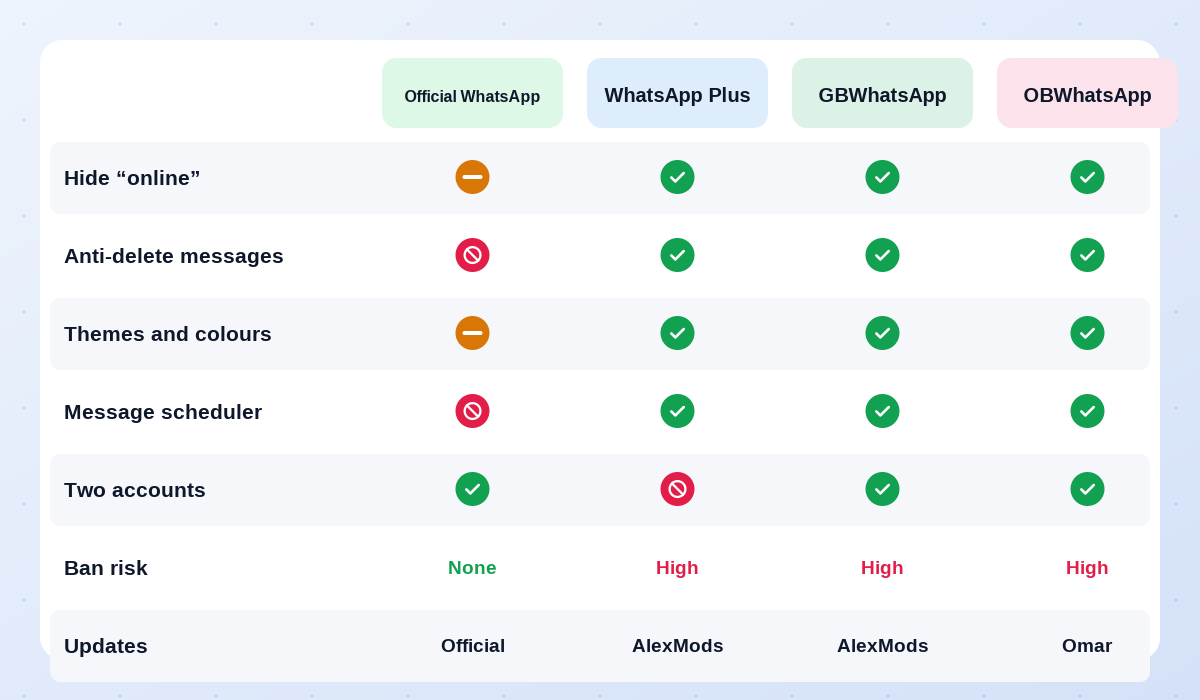 Compare ModsWhatsApp Plus vs GBWhatsApp vs OBWhatsApp side by side, a recommendation for each type of user, and the status of discontinued mods.Read guide →