

On this page
- Current status of FMWhatsApp in 2026
- What FMWhatsApp was and why it became so popular
- Why you should not install "new" FMWhatsApp APKs you find today
- Does the last FMWhatsApp version still work?
- Best active alternatives to FMWhatsApp
- How to move your chats from FMWhatsApp to WhatsApp Plus or GBWhatsApp
- FMWhatsApp last known version
- FMWhatsApp FAQ
- Related guides
- Our conclusion
For years, FMWhatsApp (often searched as "Fouad WhatsApp" or "FM WhatsApp Fouad Mods") was the mod people recommended to anyone who wanted a phone that looked different from everyone else's. Its theme store, detailed privacy menu and quick update rhythm made it one of the big three alongside WhatsApp Plus and GBWhatsApp.
That chapter is over. In this page we give you the verified status of FMWhatsApp in 2026, explain why the "new" versions you see advertised are not what they claim to be, and show you how to move your chats to a mod that is still maintained without losing anything.
FMWhatsApp is no longer developed. The last widely distributed version is 10.10, no newer build from Fouad Mods has appeared since, and the developer's public Telegram channel can no longer be accessed. We do not offer FMWhatsApp downloads. If you still use it, back up your chats and switch to an active mod such as WhatsApp Plus, GBWhatsApp or OBWhatsApp.
 App information
| Name | FMWhatsApp |
|---|---|
| Status | Discontinued |
| Last known version | 10.10 |
| Requires Android | 5.0+ |
| Developer | Fouad Mods |
| Category | Communication (mod) |
| Package | com.fmwhatsapp |
FMWhatsApp no longer receives official updates. Sites advertising “new” versions usually distribute old copies or modified clones. These alternatives are still active:
Current status of FMWhatsApp in 2026
In September 2026 our team went back to the places where FMWhatsApp used to be announced and checked what is actually there. The result is clear: there has been no new build from Fouad Mods after version 10.10, and Fouad Mods' public Telegram channel, which was the main place where releases were posted, is no longer accessible.
- Developer: Fouad Mods (the team around Fouad Mokdad).
- Last widely distributed version: 10.10.
- New releases since then: none that we could trace back to the developer.
- Developer channel: no longer publicly accessible.
- Status on WasaPlus: discontinued, no download offered.
Fouad Mods has not published any statement explaining why development stopped, so we will not guess. What matters for you is the practical consequence: nobody is updating the WhatsApp base inside FMWhatsApp any more, nobody is fixing bugs, and nobody is reacting when WhatsApp changes its servers. Sites that promise "FMWhatsApp 2026" or "FMWhatsApp latest update" are either re-uploading 10.10 under a new label or distributing unofficial clones built by unknown people.
The same situation applies to YoWhatsApp, which was also maintained by Fouad Mods and stopped at the same version number.
What FMWhatsApp was and why it became so popular
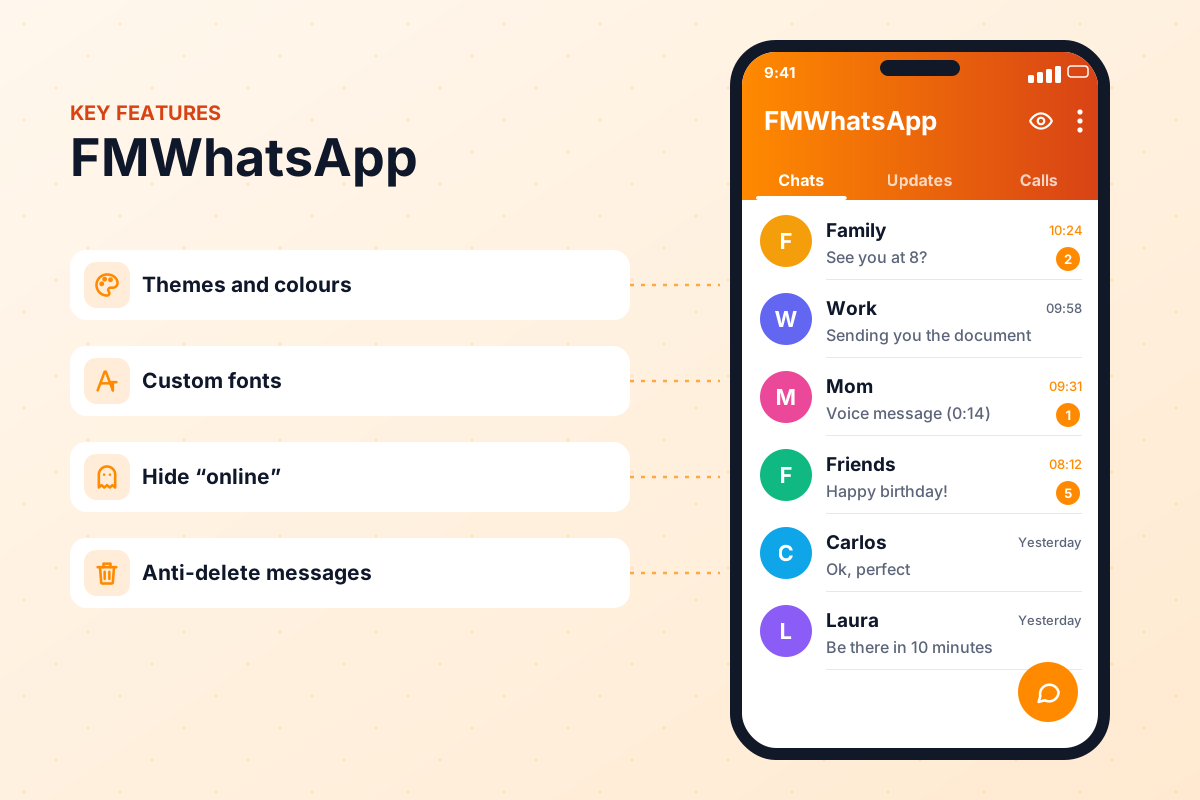
FMWhatsApp was an unofficial, modified version of WhatsApp for Android. The letters FM stood for Fouad Mods. The app took the official Android client, added an extra settings menu called Fouad Mods and filled it with hundreds of options that the official app did not have. You registered with your normal phone number and could chat with anyone on WhatsApp.
Several things made it stand out from the crowd:
Thousands of community themes that changed colours, icons, bubbles and the whole home screen in one tap.
Dozens of fonts, tick styles and launcher icons, which let users build a truly personal look.
Hiding online status, freezing last seen, hiding blue ticks, typing and recording indicators.
Keeping messages and statuses that the sender deleted for everyone.
Sending longer videos, larger documents and images with less compression than the official app.
Separate package names that allowed a second account next to the official WhatsApp.
Names like FM WhatsApp gold or FM WhatsApp blue never referred to separate apps. They were colour variants or preset themes of the same mod, often repackaged by third-party sites. Today those names are mostly used as bait for old or modified files, so treat them with the same caution as any other "new" FMWhatsApp download.
Themes were the real reason many people stayed loyal to FMWhatsApp. The good news is that theme styles did not disappear with the app: dark, minimal, neon and iPhone-inspired looks are all available in active mods, as we explain in our themes and wallpapers guide.
Why you should not install "new" FMWhatsApp APKs you find today
Search for FM WhatsApp download right now and you will still find dozens of pages with big green buttons, fresh dates and version numbers that never existed. That is exactly the problem. When a popular app stops being updated, its name keeps attracting traffic, and that traffic is valuable to people who repackage APKs.
- Expired builds: the genuine last version, 10.10, is built on an old WhatsApp base that WhatsApp can block at any moment with a "this version has expired" or "update WhatsApp" screen.
- Renamed copies: many "FMWhatsApp 2026" files are simply 10.10 with a new label, sometimes with extra adware added.
- Unofficial clones: other files are built by unknown people who borrow the FMWhatsApp name and icon. You have no idea what code they added.
- Malware and data theft: a messaging app has access to your chats, contacts, microphone and media, which makes it a perfect target for malicious modifications.
- Higher ban risk: old, unmaintained bases are easier for WhatsApp to detect than current mods, so the chance of a temporary or permanent ban goes up.
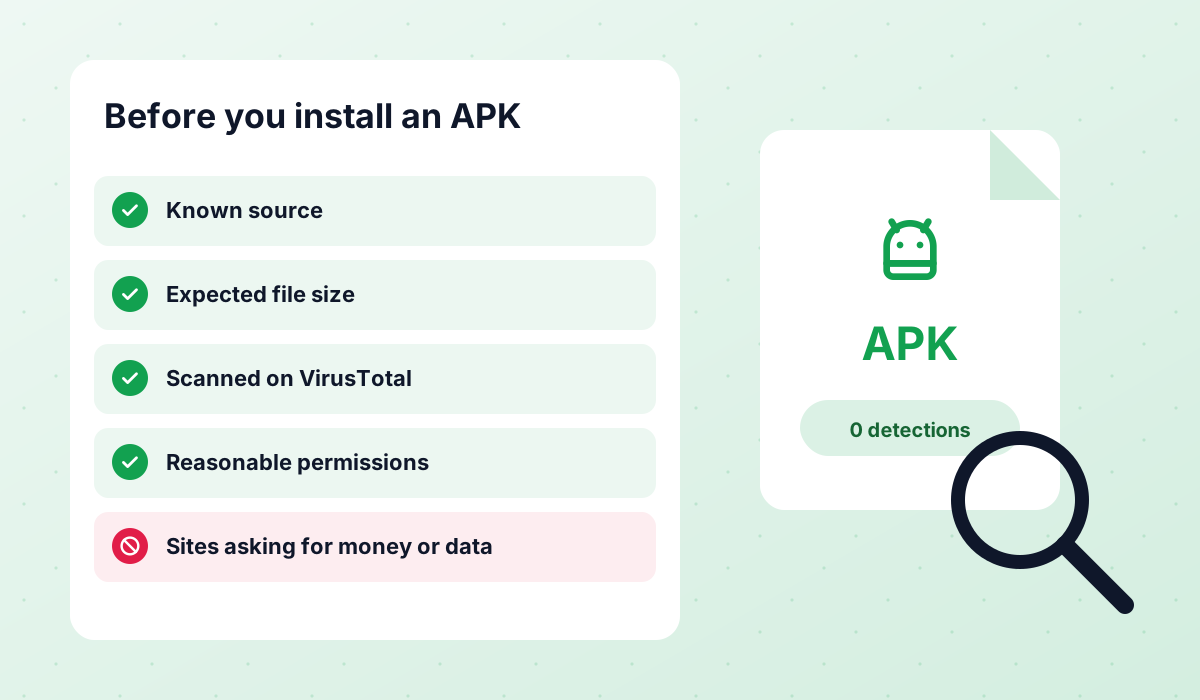
How to spot a fake FMWhatsApp download
- It claims a version higher than 10.10 or calls itself "FMWhatsApp 2026".
- It says it was "updated today" but gives no changelog or source.
- It asks you to complete surveys, install other apps or enable notifications first.
- The APK asks for permissions a messenger does not need, such as accessibility or device admin.
- An online malware scanner flags the file, even with a single detection.
- The site presents itself as the developer's home, even though Fouad Mods no longer publishes anything.
If you want to understand how to check an APK in general, our mod safety guide explains how to scan files, read permissions and react after a ban.
Does the last FMWhatsApp version still work?
It may open, and for some people it may even keep sending messages for a while. But "it still opens" is not the same as "it still works". A mod that is no longer updated is living on borrowed time, and we do not recommend relying on it.
- Expiry: WhatsApp regularly raises the minimum version it accepts. When that happens, an old base shows an expiry screen and stops connecting, and there will be no update to fix it.
- Registration and linking: unmaintained builds can fail when you verify your number again, restore on a new phone or try to link WhatsApp Web and other devices.
- Ban risk: an outdated client is easier to identify, so the risk of a ban is higher than with a mod that is kept current.
- No security fixes: bugs in the old code will never be patched.
The sensible move is to treat FMWhatsApp as finished: make a backup while it still opens and move to an active mod or back to the official app. Please do not try date tricks, old APK hunting or other ways to keep an expired build alive; they rarely work and put your number at risk.
Best active alternatives to FMWhatsApp
Three mods are still being updated by their developers in 2026: WhatsApp Plus and GBWhatsApp, both released by AlexMods, and OBWhatsApp by Omar Al-Annabi. All three offer the privacy, theme and media features FMWhatsApp users are used to. Like every mod, none of them is affiliated with WhatsApp and all of them carry a ban risk.
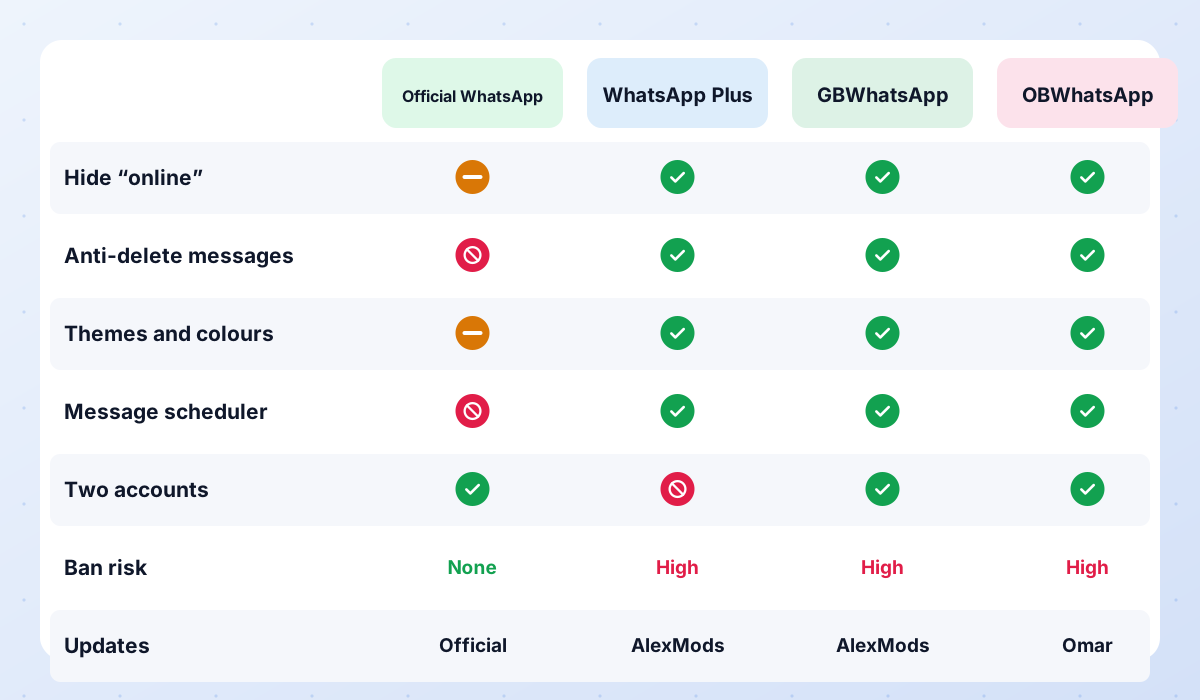
| What you get | WhatsApp Plus | GBWhatsApp | OBWhatsApp |
|---|---|---|---|
| Status | Active | Active | Active |
| Developer | AlexMods | AlexMods | Omar Al-Annabi |
| Latest version | 18.80 | 18.80 | 71 |
| Default look | Blue | Classic green | Colour variants |
| Theme store | ✔ | ✔ | ✔ |
| Custom fonts and icons | ✔ | ✔ | Varies |
| Hide online / blue ticks | ✔ | ✔ | ✔ |
| Anti-delete messages | ✔ | ✔ | ✔ |
| Several accounts on one phone | Varies | ✔ | ✔ (OB2, OB3) |
| Best for former FM users who… | Want a clean, polished app | Loved themes and deep settings | Need two or three numbers |
| Ban risk | Yes | Yes | Yes |
GBWhatsApp: the closest match for theme lovers
If you picked FMWhatsApp for its theme store and endless settings, GBWhatsApp will feel the most familiar. The Pro builds by AlexMods (18.80) have a large theme library, custom fonts, auto-reply, a message scheduler and dual-account options. Note that AlexMods warns that recent builds cannot be used with numbers that are already banned.
WhatsApp Plus: the polished all-rounder
WhatsApp Plus is released by the same developer on the same release train, currently 18.80. It has the iconic blue design, a tidy Plus settings menu and all the core privacy features. Some websites advertise higher version numbers than the ones AlexMods actually publishes, so check the number before you trust a download.
OBWhatsApp: for several accounts and Arabic users
OBWhatsApp (WhatsApp Omar) by Omar Al-Annabi is still updated in 2026 and is released in numbered builds (OBWhatsApp, OB2, OB3) that let you run several accounts side by side. It is a strong choice if you used FMWhatsApp clone builds for a second number.

APK file for Android · Free · No sign-up

APK file for Android · Free · No sign-up
Still unsure? Our full WhatsApp mods comparison puts the three active mods side by side and lists every discontinued one with its status.
How to move your chats from FMWhatsApp to WhatsApp Plus or GBWhatsApp
Moving your history is easier than most people expect, as long as you make a local backup first. Do it now, while your FMWhatsApp still opens; if it has already expired, your last automatic backup may still be sitting in its folder.
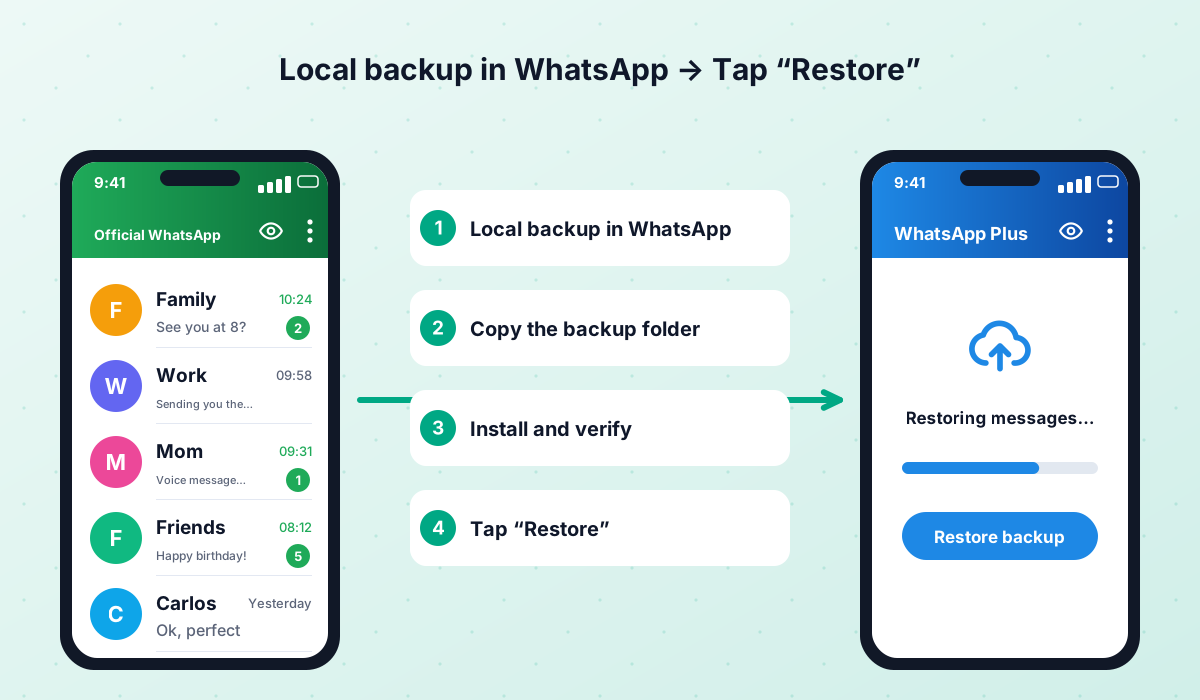
- 1Make a local backup in FMWhatsApp
Open FMWhatsApp, go to Settings → Chats → Chat backup and tap Back up. Wait until it finishes.
- 2Find the backup folder
Open a file manager and locate the FMWhatsApp folder (on recent Android versions usually under Android/media). Inside, the Databases folder holds your message backups.
- 3Copy it somewhere safe
Copy the whole FMWhatsApp folder to a computer, SD card or cloud storage before you touch anything else.
- 4Prepare the folder for the new mod
Copy or rename the folder to the name the new mod expects, keeping the Databases and Media subfolders. Our backup guide lists the usual folder names.
- 5Uninstall FMWhatsApp
Only after checking that your copy exists. One number can only be active in one app at a time anyway.
- 6Install the new mod
Install WhatsApp Plus or GBWhatsApp, allowing unknown sources only for the time of the installation.
- 7Verify and restore
Grant storage or media permission, verify your number and tap Restore when the app finds your backup. Then set your privacy options and theme again.
You can also go back to official WhatsApp from Google Play: rename the backup folder to WhatsApp, install the official app and restore. After that, turn on Google Drive backup for automatic protection.
FMWhatsApp last known version
The table below shows the last version that was widely distributed. It is listed for reference only: we do not provide download links for it, because the build is outdated and no longer maintained.
| Version | Date | Size | Status |
|---|---|---|---|
| FMWhatsApp 10.10 | — | — | Discontinued |
FMWhatsApp no longer receives official updates. Sites advertising “new” versions usually distribute old copies or modified clones. These alternatives are still active:
FMWhatsApp FAQ
Is FMWhatsApp discontinued?
Is there an FMWhatsApp 2026 version?
Can I still use FMWhatsApp?
What replaced FMWhatsApp?
Will I lose my chats if I switch?
Is FMWhatsApp safe now?
What was FM WhatsApp gold?
Are FMWhatsApp themes still usable?
Related guides
WhatsApp PlusActive v18.80The complete guide to WhatsApp Plus APK: latest version download, features, installation, updates, safety, backups and fixes for common problems.View and download →GBWhatsAppActive v18.80Everything about GB WhatsApp Pro: latest APK download, features, colour versions, installation, updates, safety, backups and troubleshooting.View and download → OBWhatsApp (Omar)Active v71OBWhatsApp by Omar Al-Annabi: numbered builds for multiple accounts, colour versions, features, install steps and safety advice.View and download →Is It Safe?An honest look at the risks of WhatsApp Plus, GBWhatsApp and discontinued mods like FMWhatsApp, how to check an APK and what to do after a ban.Read guide →
 Backup & RestoreLocal backups, restoring chats, transferring between mods and official WhatsApp, and updating without losing your history.Read guide →Compare ModsWhatsApp Plus vs GBWhatsApp vs OBWhatsApp side by side, a recommendation for each type of user, and the status of discontinued mods.Read guide →
Our conclusion
FMWhatsApp earned its place in WhatsApp modding history, but it is no longer developed and there is no safe way to get a "new" version. Back up your chats while you still can, ignore sites promising FMWhatsApp 2026, and move to an actively maintained mod such as WhatsApp Plus, GBWhatsApp or OBWhatsApp, or back to the official app if your number is too important to risk.
APK file for Android · Free · No sign-up
Updated: · By WasaPlus editorial team