

On this page
"Is WhatsApp Plus safe?" is one of the most common questions we get, and it deserves a straight answer. WhatsApp mods are unofficial apps built by independent developers who modify WhatsApp's code. They are not on Google Play, they are not reviewed by Meta, and WhatsApp's terms of service do not allow them.
That does not mean every mod is malware, but it does mean you are taking on risks that do not exist with the official app. Below we explain those risks honestly and give you a practical checklist to reduce them as much as possible.
WhatsApp Plus, GBWhatsApp, FMWhatsApp and similar apps are not affiliated with WhatsApp LLC or Meta. Using them can lead to temporary or permanent account bans, and third-party APKs can carry malware. Nobody can guarantee a mod is 100% safe.
The main risks of WhatsApp mods
1. Account bans
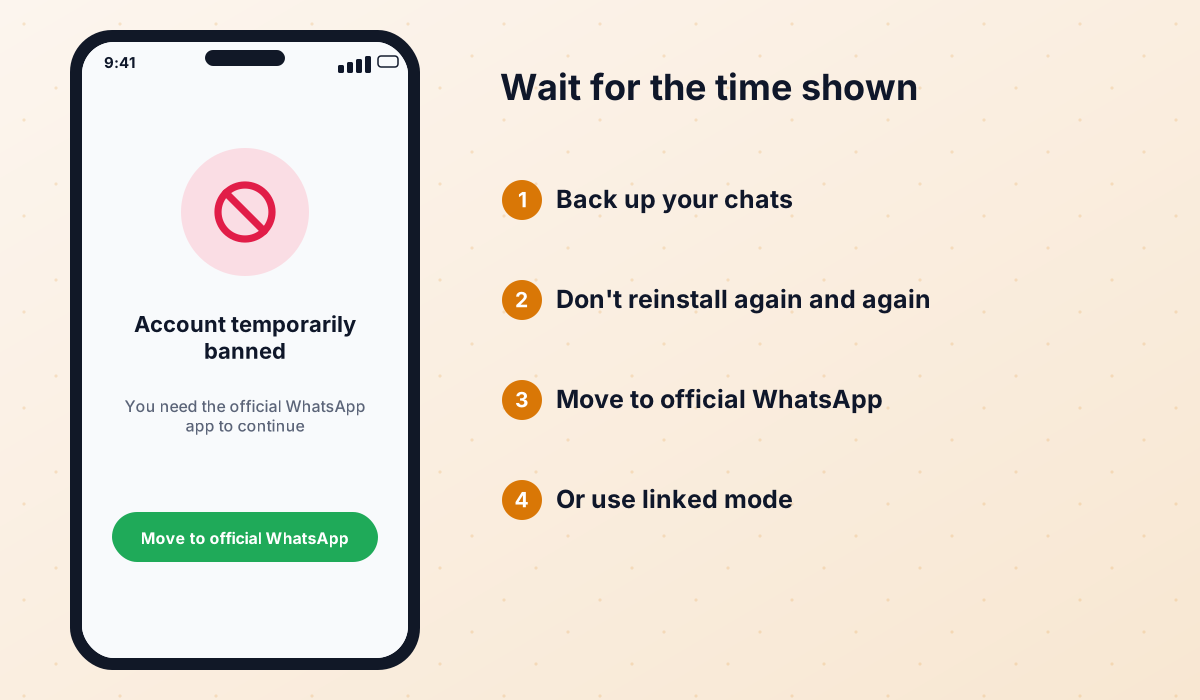
This is the most likely problem. WhatsApp actively detects unofficial clients. When it does, it usually starts with a temporary ban, which shows a countdown and asks you to switch to the official app. Repeated offenses can lead to a permanent ban of the phone number.
Developers advertise "anti-ban" protection, and some builds do seem to be detected less often than others. However, that is only the developers' claim. Bans still happen with every mod, and the situation can change overnight when WhatsApp updates its detection.
2. Malware in fake or repackaged APKs
Because mods are distributed outside Google Play, anyone can take an APK, inject malicious code and upload it under the same name. Fake versions have been found that show intrusive ads, subscribe users to premium services or try to steal data. This risk depends almost entirely on where you download the file.
3. Privacy
A mod has access to the same data as WhatsApp: your messages, contacts, photos and microphone. You are trusting an anonymous developer with all of it. There is no independent audit, and the source code is usually not published. Keep that in mind before using a mod on the number you use for work or banking codes.
4. No official support
If something goes wrong, WhatsApp support cannot help you with a modified app. Mod developers may or may not answer messages, and projects are sometimes abandoned without warning, leaving users on outdated builds.
5. Backups and data loss
Most mods cannot use Google Drive backups the way the official app does. If you lose your phone or the mod stops working and you never made a local backup, you can lose your chat history. Our backup guide explains how to avoid that.
Is WhatsApp Plus safer than GBWhatsApp or FMWhatsApp?
There is no reliable way to rank the active ones. WhatsApp Plus, GBWhatsApp and OBWhatsApp all carry the same fundamental risks. What makes the biggest difference is choosing an actively maintained build, downloading it from a trusted source and keeping it updated. That is also why FMWhatsApp is now a worse choice: it is discontinued, its last build is outdated and most files circulating under its name are re-uploads or clones.
| Risk factor | Official WhatsApp | WhatsApp mods |
|---|---|---|
| Allowed by WhatsApp's terms | ✔ | ✘ |
| Available on Google Play | ✔ | ✘ |
| Account ban risk | ✘ | ✔ |
| Risk of fake or infected APKs | ✘ | ✔ |
| Official support | ✔ | ✘ |
| Google Drive backup | ✔ | ✘ (usually) |
| End-to-end encryption protocol | ✔ | Depends on the build |
How to reduce the risk: checklist
- Download only from a trusted source that clearly names the developer and version, never from random file-sharing links.
- Use a secondary phone number if you just want to try a mod.
- Make a local backup of your chats before installing, updating or switching mods.
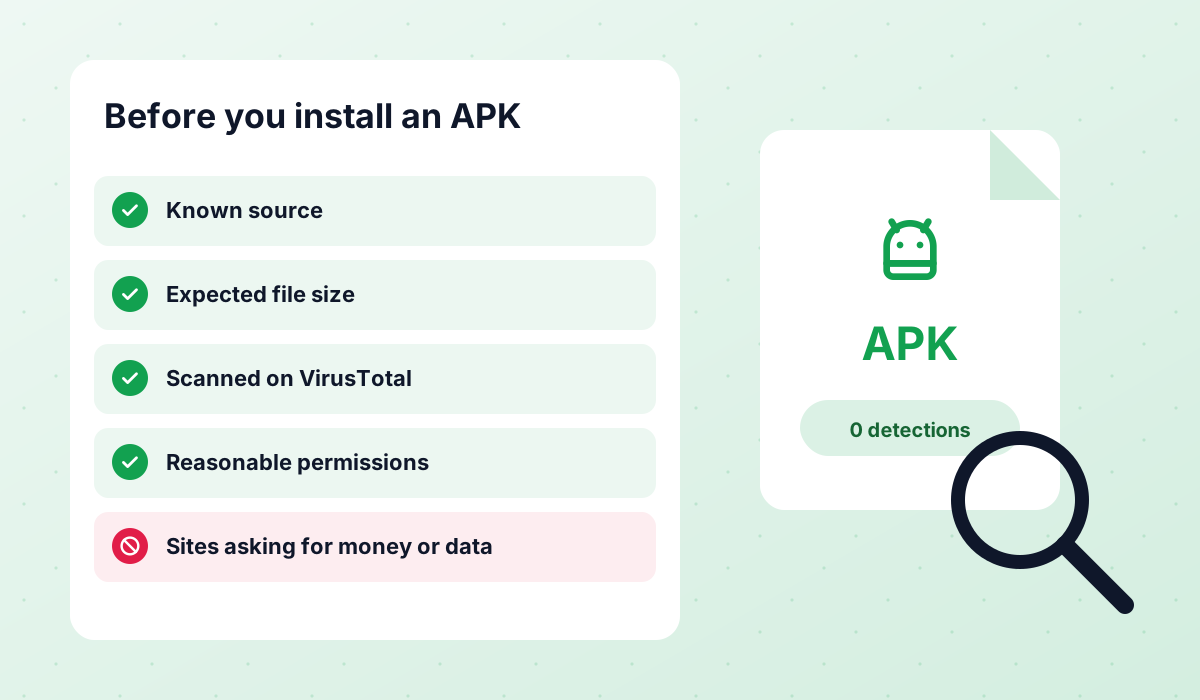
- Scan the APK before installing it (see the steps below).
- Review the permissions the app requests and deny anything that makes no sense.
- Disable "install unknown apps" again once the installation is finished.
- Keep the mod updated to the latest version; outdated builds are banned more often.
- Do not sign in to banking or work accounts via links received in a mod.
- Turn on two-step verification in the app's account settings.
How to check an APK before installing it
You cannot prove that an APK is clean, but you can catch many obvious problems with a few quick checks. It only takes a couple of minutes.
- 1Check the source
Make sure the page lists the developer (AlexMods for the blue WhatsApp Plus build), the version number and the file size. A file that is much smaller or larger than expected is a red flag.
- 2Upload it to VirusTotal
On your computer or phone browser, open VirusTotal and upload the APK. It scans the file with dozens of antivirus engines. A couple of generic "riskware" labels are common for mods; multiple specific trojan detections are not.
- 3Look at the permissions
During installation, or with an APK inspector app, review what the app asks for. A messaging app needs contacts, storage, camera and microphone. It has no reason to request SMS sending, accessibility services or device administrator rights.
- 4Compare the signature
If you already have the mod installed, an update from the same developer should install over it without errors. A "signature conflict" message can mean the file was repackaged by someone else.
- 5Watch the first few days
After installing, look out for unexpected ads, new apps you did not install, battery drain or unknown subscriptions. If anything looks off, uninstall immediately.
Google Play Protect often warns about any app installed from outside the Play Store, including legitimate mods. A warning is not proof of malware, but do not simply ignore it: combine it with the checks above before deciding.
What to do after a ban
If you see a temporary ban message, do not panic and do not try to trick the system. Follow these steps instead:
- Wait for the countdown to finish; trying to register again during the ban can make it longer.
- Make a local backup of your chats from the mod's settings, if it still lets you.
- Uninstall the mod and install official WhatsApp from Google Play.
- Verify your number and restore the local backup when the app offers it (the file may need to be moved to the official WhatsApp folder first).
- If the ban is permanent, you can request a review through the official app, explaining that you have stopped using the unofficial client.
Once you are back on the official app, it is best to stay there with that number. If you still want mod features, consider a separate number used only for testing.
What about iPhone and PC?
There is no real WhatsApp Plus for iPhone, and sites that offer an "IPA" usually distribute something else entirely. Read our WhatsApp Plus for iPhone guide for the honest details. On computers, mods can only run inside an Android emulator, which we explain in our WhatsApp Plus for PC guide.
Frequently asked questions
Is WhatsApp Plus a virus?
Is FMWhatsApp safe?
Does anti-ban really work?
Can a mod read my messages?
Will I lose my chats if I get banned?
Is it illegal to use WhatsApp Plus?
 WhatsApp PlusActive v18.80The complete guide to WhatsApp Plus APK: latest version download, features, installation, updates, safety, backups and fixes for common problems.View and download →
 GBWhatsAppActive v18.80Everything about GB WhatsApp Pro: latest APK download, features, colour versions, installation, updates, safety, backups and troubleshooting.View and download →
 OBWhatsApp (Omar)Active v71OBWhatsApp by Omar Al-Annabi: numbered builds for multiple accounts, colour versions, features, install steps and safety advice.View and download →
 Backup & RestoreLocal backups, restoring chats, transferring between mods and official WhatsApp, and updating without losing your history.Read guide →
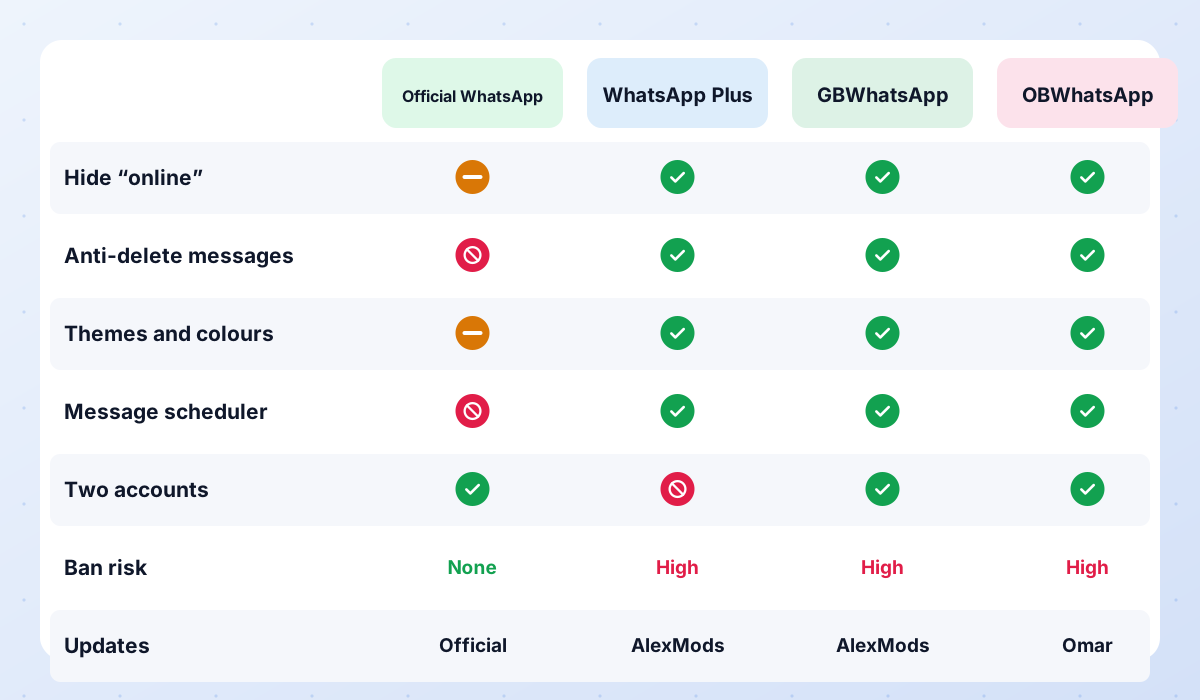 Compare ModsWhatsApp Plus vs GBWhatsApp vs OBWhatsApp side by side, a recommendation for each type of user, and the status of discontinued mods.Read guide →
 FMWhatsAppDiscontinued v10.10FMWhatsApp is discontinued: no new builds from Fouad Mods since 10.10. Status, risks of fake APKs and the best active alternatives.View and download →
Our verdict
WhatsApp mods are popular for good reasons, but they are never risk-free. If you decide to use one, do it with your eyes open: choose a trusted and updated build, use a secondary number when possible, check every APK and keep regular backups. If your main number is critical for work or family, the official app is the safer choice.