

On this page
- What is GB WhatsApp?
- GBWhatsApp vs GBWhatsApp Pro: what's the difference?
- What's new in GB WhatsApp 18.80
- GB WhatsApp features
- GB WhatsApp colour versions: black, red, blue and transparent
- GB WhatsApp themes and wallpapers
- GB WhatsApp requirements
- How to download and install GB WhatsApp
- How to update GB WhatsApp to the latest version
- GB WhatsApp old versions
- GB WhatsApp vs official WhatsApp
- GB WhatsApp vs WhatsApp Plus vs OBWhatsApp
- Is GB WhatsApp safe?
- GB WhatsApp ban and anti-ban explained
- Backup and transfer chats in GB WhatsApp
- GB WhatsApp on PC
- GB WhatsApp for iPhone
- GB WhatsApp pros and cons
- GB WhatsApp troubleshooting
- More WhatsApp mods and guides
- GB WhatsApp FAQ
- Conclusion: is GB WhatsApp worth it?
GB WhatsApp is one of the most searched WhatsApp mods. Whether you type “gb whatsapp”, “g b whatsapp”, “GBWhatsApp Pro” or “gb whatsapp download”, you are looking for the same thing: a version of WhatsApp that lets you hide your online status, read deleted messages, download statuses, run two accounts and style the app any way you like.
This page gives you the GBWhatsApp APK download for the latest version 18.80, along with an honest, detailed guide: what GB WhatsApp is, who develops it today, what's new, every major feature, how to install and update it, and what the real risks are. We test each release on secondary Android phones before updating this guide.

APK file for Android · Free · No sign-up
App information| Name | GBWhatsApp |
|---|---|
| Status | Active |
| Version | 18.80 |
| Size | 111 MB |
| Requires Android | 5.0+ |
| Developer | AlexMods |
| Updated | |
| License | Free |
| Category | Communication (mod) |
| Package | com.gbwhatsapp |
GBWhatsApp is not affiliated with WhatsApp LLC or Meta and is not available on Google Play. Using it breaks WhatsApp's terms of service and can lead to a temporary or permanent ban of your number. Fake GB WhatsApp APKs with malware are common. Always back up your chats, download from a source you trust, scan the file and consider using a secondary number. Learn more in our WhatsApp mods safety guide.
What is GB WhatsApp?
GBWhatsApp is a modified version of the official WhatsApp Messenger for Android. Independent developers take the original app, add extra features and remove some limits, and then share it as an APK file that you install manually. It connects to the regular WhatsApp network, so you can message anyone, even if they use the normal WhatsApp on Android or iPhone.
Think of it as WhatsApp with a giant settings menu attached. Everything you know is still there, including chats, groups, calls, statuses and communities, but GB WhatsApp adds a menu called GB Settings with hundreds of options for privacy, appearance and media.
Where does GB WhatsApp come from?
The name “GB” is often explained as Golden Build, and the mod dates back to the early days of WhatsApp mods in the mid-2010s. Early builds are associated with well-known modders of that era, such as Has.007 and Omar, who were also involved in other popular mods. As with most WhatsApp mods, the project changed hands over the years, and different developers have released builds under the GB name.
Today, the most widely used builds are released as GBWhatsApp Pro and are attributed to AlexMods. When people search for the “original GB WhatsApp”, this is normally the build they mean: the one that is updated regularly to follow new versions of official WhatsApp.
Why is GB WhatsApp so popular?
GB WhatsApp became popular for a simple reason: it was one of the first mods to combine strong privacy tools, easy customization and a second account on the same phone. It became popular in places such as India, Pakistan, Nigeria and Latin America, where many people use a personal and a business number on the same phone. Over time, “GB WhatsApp” became almost a generic name for WhatsApp mods in general.
GBWhatsApp vs GBWhatsApp Pro: what's the difference?
You will see both names everywhere, and it can be confusing. In practice, GBWhatsApp Pro is simply the name of the current, actively maintained edition. Years ago, “GBWhatsApp” and “GBWhatsApp Pro” were distinct builds, with Pro adding extra options such as more privacy controls and a larger theme library. As development moved on, the Pro edition became the standard.
| Aspect | Old GBWhatsApp | GBWhatsApp Pro (current) |
|---|---|---|
| Actively updated | ✘ | ✔ |
| Recent WhatsApp base | ✘ | ✔ |
| Extended privacy options | Partial | ✔ |
| Theme store | ✔ | ✔ |
| Claimed anti-ban improvements | ✘ | ✔ |
| Works with current servers | ✘ | ✔ |
So if you are choosing between them, pick the latest GBWhatsApp Pro. Old “plain GB” builds are no longer maintained and usually show an “outdated version” message.
What's new in GB WhatsApp 18.80
The latest release, GB WhatsApp 18.80, was updated on October 2, 2026. Like every GB update, it moves the mod onto a newer official WhatsApp base and fixes problems reported since the previous build. Changelogs differ from release to release, but recent updates have focused on:
- A newer WhatsApp base, so recent official features such as channels, message editing, chat lock and new emoji work properly.
- Anti-ban changes claimed by the developer, aimed at lowering detection. Bans are still possible.
- Stability fixes for crashes, frozen chats, media download errors and backup problems.
- New privacy toggles, including finer control over ticks, typing indicators and status views.
- Theme and interface updates, such as refreshed GB Settings menus and new styling options.
- Better compatibility with the newest Android versions and with low-RAM phones.
Seeing a message that your GB WhatsApp is outdated? Download 18.80 and install it over your current app. Your chats stay in place, but make a backup first to be safe.
GB WhatsApp features
GB WhatsApp packs more options than most users will ever need. Below are the features people use most. Please note that feature names and availability can vary slightly between builds, and WhatsApp server changes sometimes break a feature until the next update.
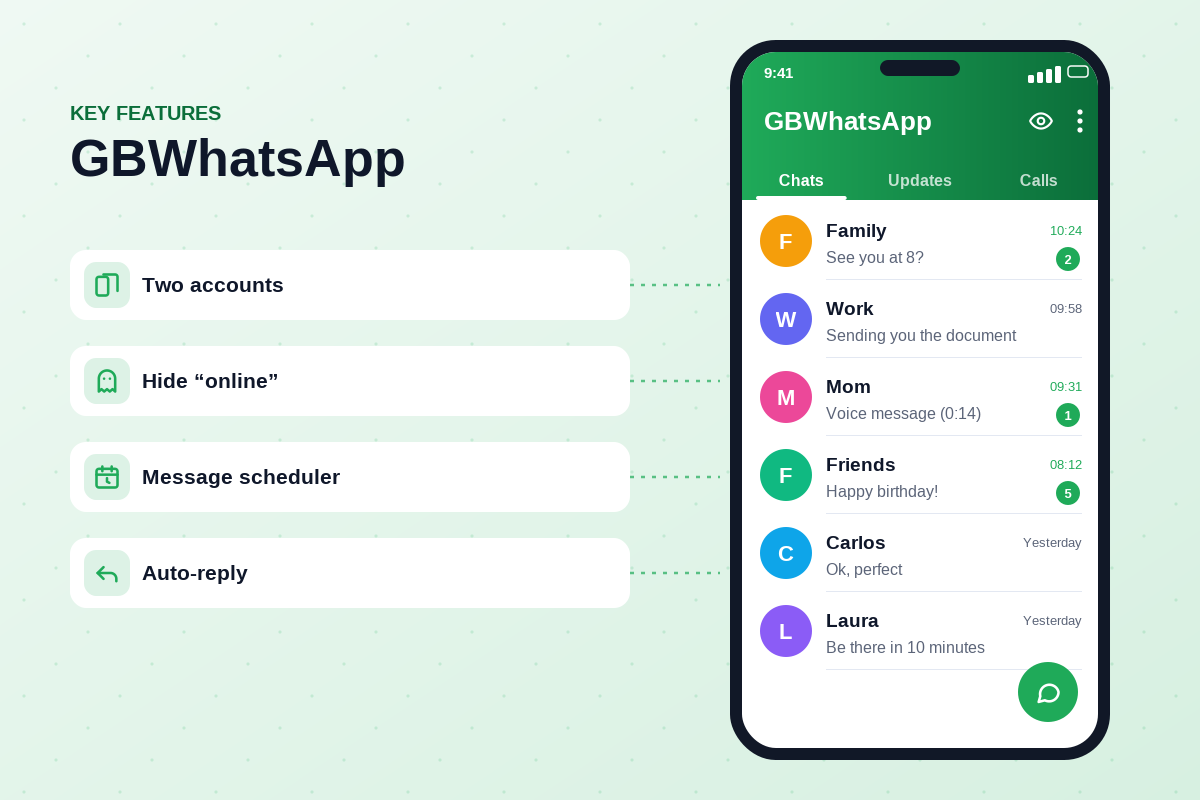
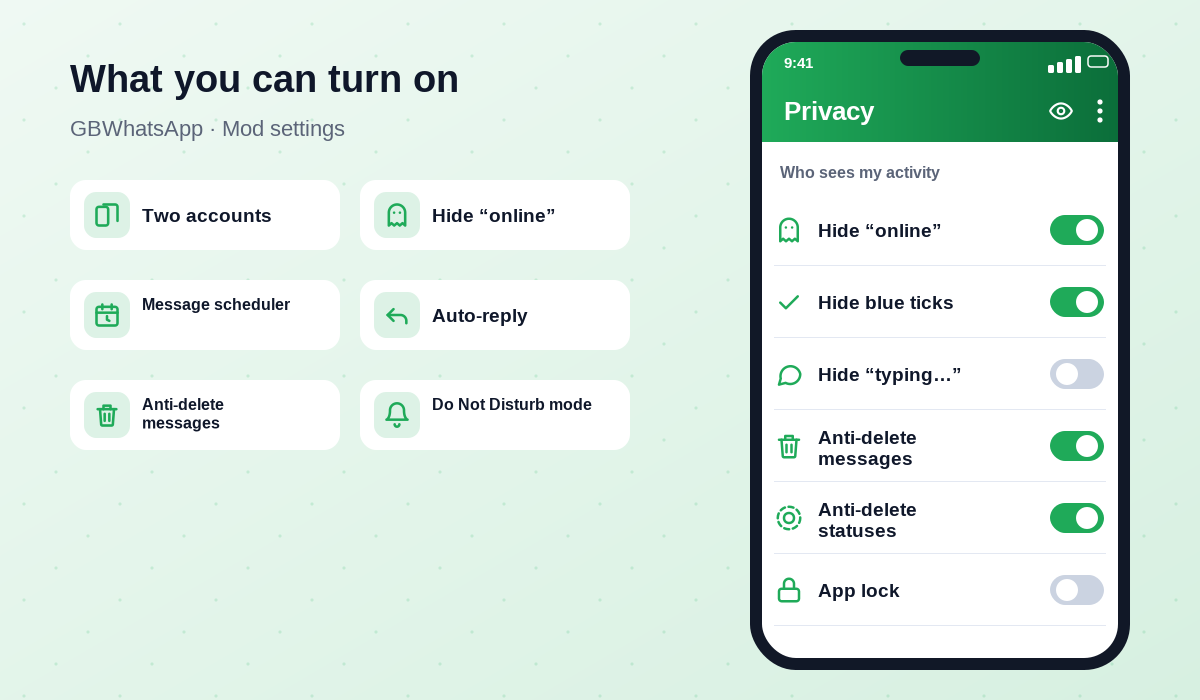
Hide your online status, ticks and typing indicators in one go and browse WhatsApp invisibly.
Read messages without showing the blue ticks until you reply or decide to show them.
Watch contacts' statuses without your name appearing in their viewers list.
Keep messages that the sender deletes for everyone, so you can still read them.
Continue viewing statuses even after the owner removes them.
Save status photos and videos straight to your gallery.
Run GB WhatsApp and official WhatsApp side by side with two different numbers.
Disconnect GB WhatsApp from the internet without turning off data for other apps.
Send automatic replies to chosen contacts, groups or everyone.
Write messages in advance and let GB WhatsApp send them at a set time.
Browse and apply thousands of community themes in a couple of taps.
Change fonts, bubble styles, tick styles and icons throughout the app.
Send bigger documents, APKs and archives than the official app allows (limits vary by build).
Share photos and videos with less compression, in near-original quality.
Protect GB WhatsApp or single chats with a PIN, pattern or fingerprint.
Translate received messages into your language directly in the chat (in builds that include it).
Choose who can call you, or turn off WhatsApp calls altogether.
Pin more conversations to the top of your chat list than the official limit.
Privacy and ghost mode
The privacy menu is the heart of GB WhatsApp. You can hide your online status, freeze your last seen at a fixed time, hide the second tick and the blue ticks, and hide “typing…” and “recording audio…”. Ghost mode switches several of these options on at once, which is handy if you want to read messages quietly.
Most builds also allow separate privacy rules for contacts and groups. For example, you can hide blue ticks in groups while keeping them visible in private chats. Remember that privacy works both ways: in some builds, hiding your own ticks means you also stop seeing other people's read receipts.
DND mode
Do Not Disturb (DND) mode cuts GB WhatsApp off from the internet while every other app keeps working. It is perfect when you want to browse, play or work without WhatsApp messages. When you turn DND off, all pending messages arrive at once. A small icon on the main screen reminds you when it is on, so you do not miss messages by accident.
Auto reply and message scheduler
GB WhatsApp brings two tools that official WhatsApp only offers in its Business app. Auto reply answers incoming messages with a text you prepare, and you can limit it to certain contacts or groups. The message scheduler lets you write a message and set the exact date and time for it to be sent, which is useful for birthday wishes, reminders or messages to people in other time zones. For the scheduler to work reliably, keep the app excluded from battery optimization.
Dual account
One of the main reasons people install GB WhatsApp is to use two WhatsApp accounts on one phone. Because GB installs with its own package name, it can sit next to official WhatsApp. Put your main number in the official app and a second number in GB, and you have two separate accounts with their own chats, contacts and notifications.
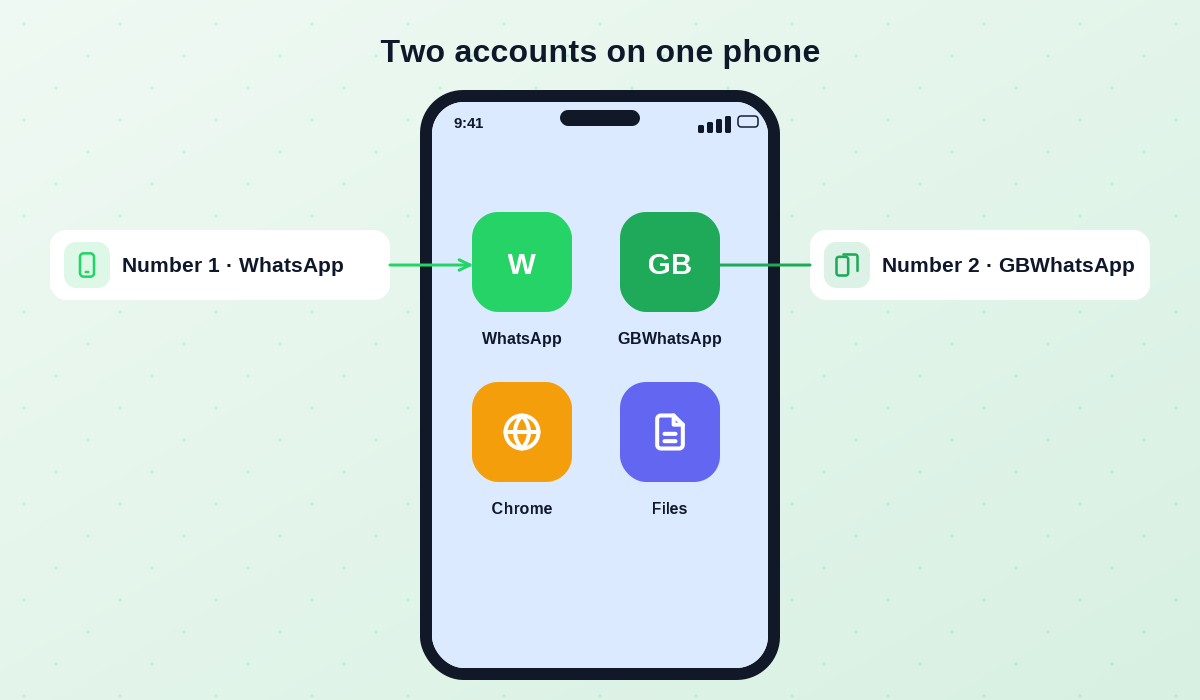
This setup is also the safest way to try the mod: if the GB number ever gets banned, your main account in the official app is not affected.
Anti-delete messages and statuses
With anti-delete turned on, messages deleted by the sender for everyone stay visible on your phone, usually with a small label that says they were deleted. The same works for statuses: you can keep watching a status even after your contact removes it. Please use this responsibly; the person deleted the message for a reason.
Status download
Saving a friend's status in official WhatsApp requires screenshots or screen recording. In GB WhatsApp, you just open the status and tap the download icon to save the photo or video in full quality. You can also copy the text of text statuses and upload longer videos to your own status in some builds.

Themes library and fonts
The built-in theme library holds thousands of themes created by the community. You can preview each one, apply it instantly and switch back to the default at any time. If you prefer to design your own look, GB lets you change the colour of headers, backgrounds, bubbles, icons and ticks, and choose from many fonts. You can even save your own design as a theme file and share it.
Large files and high-quality media
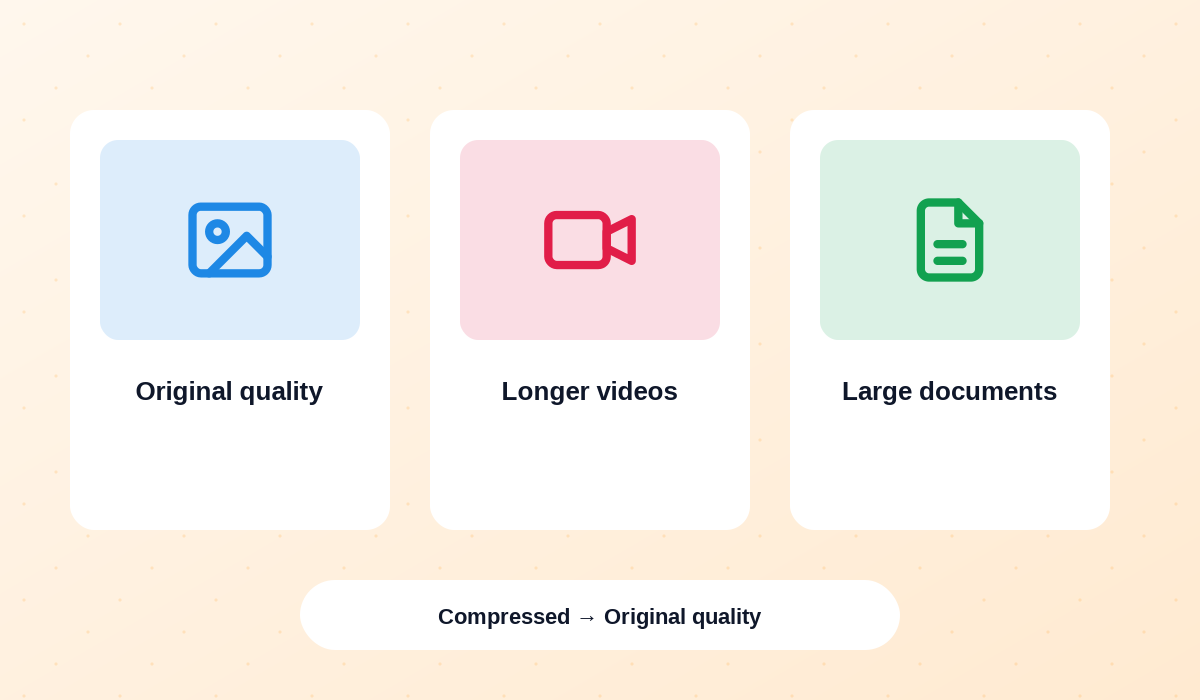
Official WhatsApp compresses photos and videos heavily and limits file sizes. GB WhatsApp raises those limits so you can send bigger documents and longer videos, share many images at once and keep photos much closer to their original quality. Exact limits depend on the build and on what the servers accept, so the numbers you see online are only approximate.
App lock and other security options
GB WhatsApp has an app lock that asks for a PIN, pattern or fingerprint when you open it, and you can lock individual chats too. Some builds also let you hide chats from the main list. These features protect your conversations from people who borrow your phone, but they do not protect you from malware or bans.
Other useful extras
- Send messages to numbers that are not saved in your contacts
- Disable the “forwarded” label on forwarded messages
- Change the app icon and notification icon
- Custom notifications and different ringtones for groups and contacts
- Filter and mass-delete messages in a chat
- See when a contact was last online in a separate log (in some builds)
- Show a contact's online status toast on the main screen
GB WhatsApp colour versions: black, red, blue and transparent
Searches like “gb whatsapp black”, “gb whatsapp red”, “gb whatsapp blue” or “gb whatsapp transparent” are extremely common. These are usually not completely different apps. Most are the same GB WhatsApp with a different default theme, or builds from other modders that use a GB base with a special design. You can recreate almost every colour version yourself from GB Settings.
- GB WhatsApp black (dark) – a full dark interface with black backgrounds, easy on the eyes at night and battery-friendly on AMOLED screens.
- GB WhatsApp red – a bold red header and accent colours, often combined with a dark background.
- GB WhatsApp blue – a blue style similar to the classic WhatsApp Plus look.
- GB WhatsApp transparent – a see-through design where your wallpaper showed through the chat list and conversations. These were third-party builds on older GB-style bases and are no longer maintained; our WhatsApp Transparent status page explains what happened and how to get a similar look with themes and wallpapers.
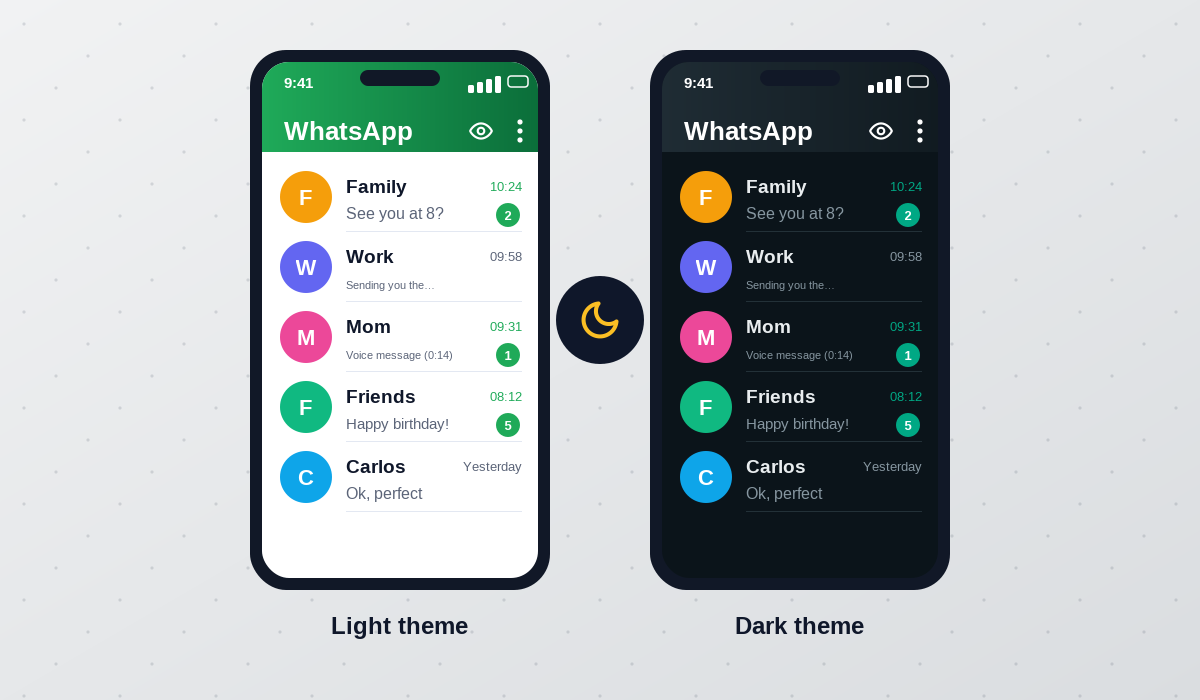
To change colours, open GB Settings → Universal → Colours for a manual setup, or GB Settings → Themes to download a ready-made dark, red or blue theme. It is usually safer to change the theme inside the app you already trust than to install an extra “coloured” APK from an unknown site.
GB WhatsApp themes and wallpapers
Themes are a big part of the GB WhatsApp experience. Open GB Settings → Themes → Download Themes to browse the library, tap one to preview it and choose Apply. The app restarts with the new look. You can also load a theme file (.xml or a zip file) that you have saved in your storage, and back up your current theme before trying a new one.
- Dark and AMOLED themes for comfortable night reading
- Minimal themes with clean white or grey layouts
- iPhone-style themes that imitate the iOS WhatsApp design
- Colourful and gradient themes with custom bubbles
- Wallpaper-focused themes that give every chat its own background
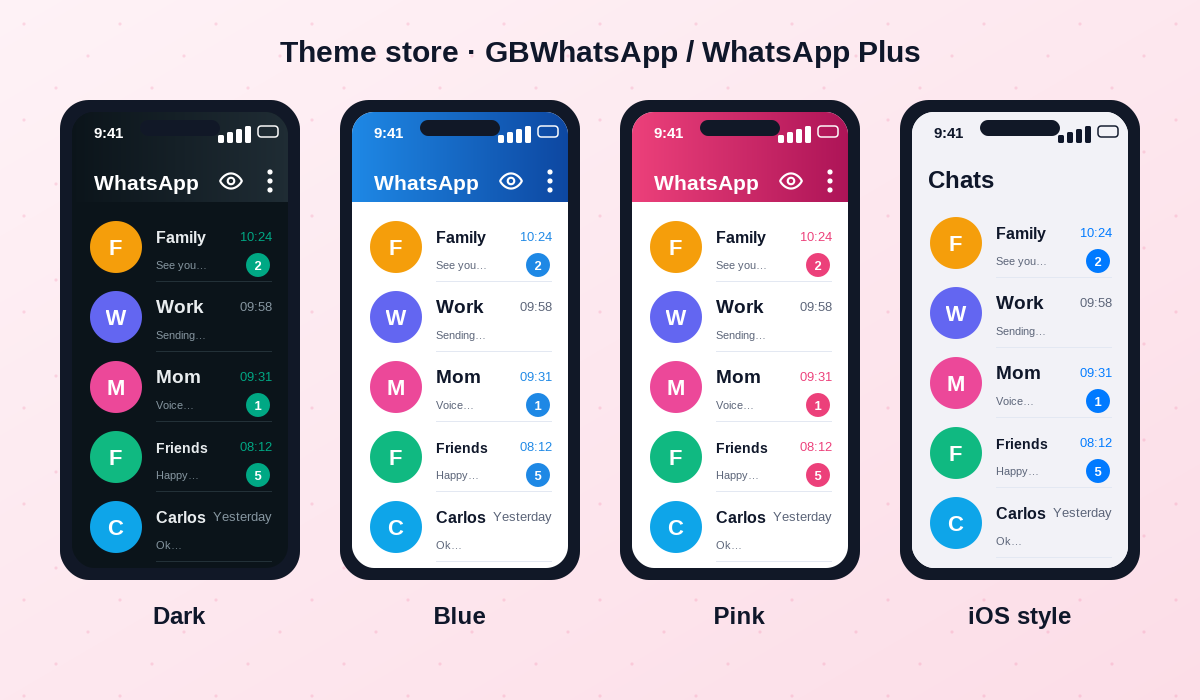
When choosing a theme, check that text remains readable in chats and notifications. For our favourite picks and tips on creating your own theme, see our best WhatsApp mod themes and wallpapers article.
GB WhatsApp requirements
GB WhatsApp runs on most Android phones sold in recent years. Before installing, make sure your device meets these requirements:
| Requirement | Details |
|---|---|
| Operating system | Android 5.0+ |
| APK size | 111 MB |
| Free storage | At least 1 GB recommended for chats and media |
| RAM | 2 GB or more recommended for smooth use |
| Phone number | A number able to receive SMS or calls for verification |
| Internet | Wi-Fi or mobile data |
| Root access | Not required |
GB WhatsApp does not work on iPhone, and it is not meant for Android TV boxes or smartwatches.
How to download and install GB WhatsApp
Installing GB WhatsApp takes only a few minutes. If you plan to use your current WhatsApp number in GB, start with a backup so you can bring all your chats with you.
- 1Back up your WhatsApp chats
In official WhatsApp, open Settings → Chats → Chat backup and tap Back up to create a local backup on your phone.
- 2Download the GB WhatsApp APK
Tap the download button on this page to get GB WhatsApp 18.80 (111 MB). Avoid APKs shared in groups or offered in pop-up ads.
- 3Enable unknown sources
Open the downloaded file. Android will ask permission to install apps from this source. Tap Settings and turn on “Allow from this source”. On older Android versions, go to Settings → Security → Unknown sources.
- 4Install the APK
Tap Install. If Google Play Protect warns you, read the message; it appears for all apps outside Play Store. Continue only if you trust the source.
- 5Open GB WhatsApp
Launch the app, allow access to contacts, storage and notifications, and tap Agree and continue.
- 6Verify your number
Enter your phone number with the country code and type the six-digit code you receive by SMS or call.
- 7Restore your chats
If GB WhatsApp detects a local backup, tap Restore. Wait until messages and media are imported.
- 8Customize GB Settings
Set your name and profile photo, then open the menu → GB Settings to configure privacy, themes and other options.
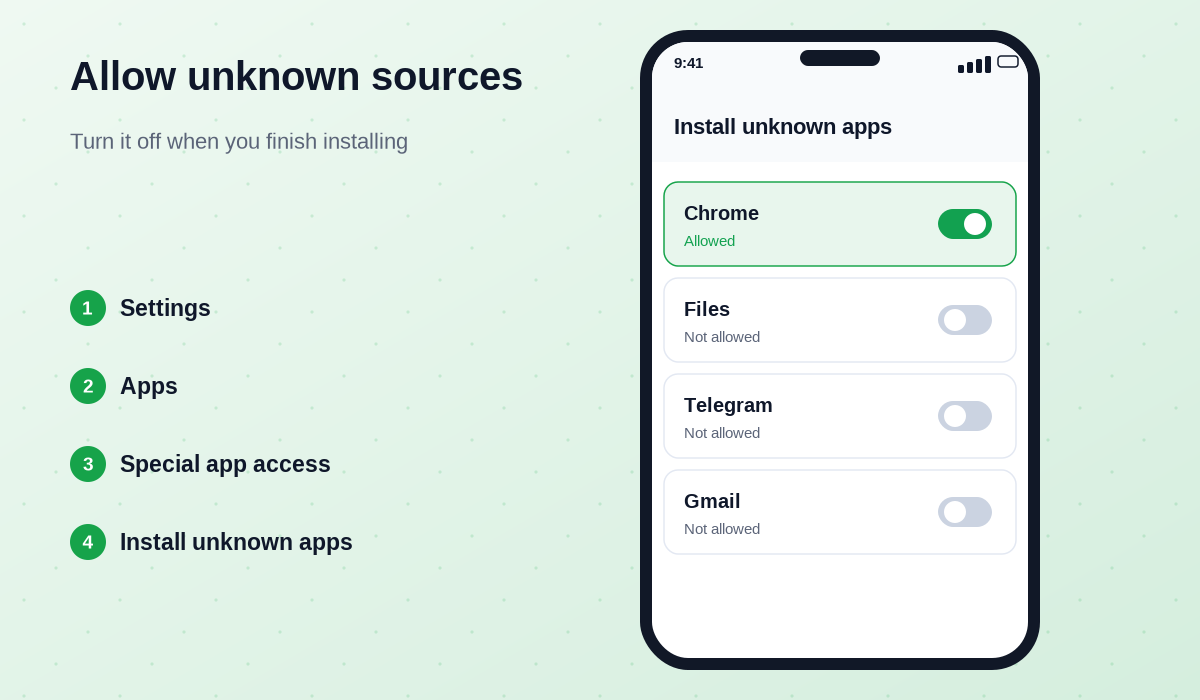
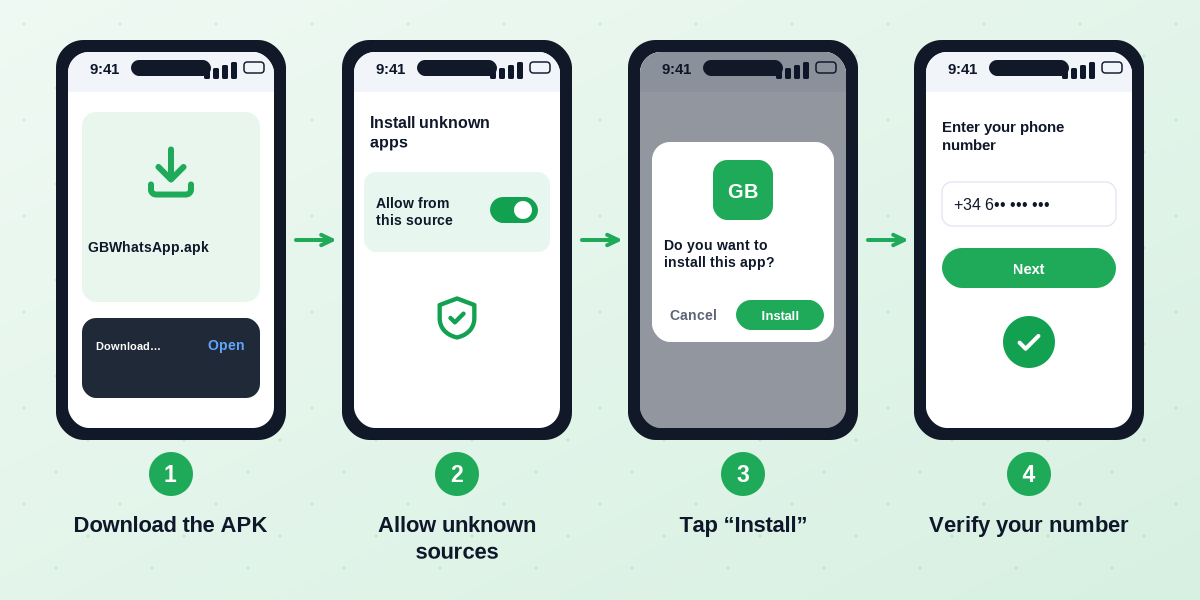
Want to keep official WhatsApp? Use a different number in GB WhatsApp and skip the backup step. Both apps can run on the same phone at the same time.
How to update GB WhatsApp to the latest version
GB WhatsApp does not update through Google Play, so you need to install new versions yourself. The good news is that updating over the existing app keeps all your chats. Here's how to do it:
- 1Back up first
Open GB WhatsApp → Settings → Chats → Chat backup and tap Back up.
- 2Check your version
Go to GB Settings → Updates, or Settings → Help → App info, and compare your version with the latest, 18.80.
- 3Download the latest APK
Get the new GB WhatsApp APK from this page. Do not uninstall the current app.
- 4Install over the old version
Open the APK and tap Update. Android keeps your data while replacing the app.
- 5Open and confirm
Launch GB WhatsApp and check that your chats are there. If asked to verify again, verify and restore from your fresh backup.
Why you shouldn't use old versions like GB WhatsApp 6.50
Some people still search for old builds such as GB WhatsApp 6.50, often because a friend recommended it years ago or because it ran well on an older phone. The problem is that these builds are based on very old versions of WhatsApp. WhatsApp's servers no longer accept them, so you will see an “outdated version” message or be unable to register at all.
Old builds also miss years of bug fixes and security patches, and they are more likely to be detected as unofficial. Worse, many sites offering these “classic” versions repackage them with adware. If you want the features you remember, the current GB WhatsApp 18.80 has all of them and more.
GB WhatsApp old versions
For completeness, here is the list of previous GB WhatsApp releases. Use an older version only temporarily, for example if the newest build has a bug on your device, and update again as soon as a fix is available.
| Version | Date | Size | Download |
|---|---|---|---|
| GBWhatsApp 18.80 Updated | October 2, 2026 | 111 MB | APK |
GB WhatsApp vs official WhatsApp
How does GB WhatsApp compare with the WhatsApp you get from Google Play? The mod wins on features and customization, while the official app wins on safety, support and backups.
| Feature | GB WhatsApp | Official WhatsApp |
|---|---|---|
| Available on Google Play | ✘ | ✔ |
| Supported by WhatsApp / Meta | ✘ | ✔ |
| Ghost mode | ✔ | ✘ |
| Hide online status | ✔ | Partial |
| Freeze last seen | ✔ | ✘ |
| Hide blue ticks per chat | ✔ | ✘ |
| Hide typing / recording | ✔ | ✘ |
| Anti-delete messages | ✔ | ✘ |
| Anti-delete status | ✔ | ✘ |
| Status downloader | ✔ | ✘ |
| DND mode | ✔ | ✘ |
| Auto reply | ✔ | Business only |
| Message scheduler | ✔ | ✘ |
| Theme library | ✔ | ✘ |
| Custom fonts and icons | ✔ | ✘ |
| Larger file limits | ✔ | ✘ |
| High-quality media | ✔ | Partial |
| Dual account on one phone | ✔ | Partial |
| Google Drive backup | ✘ | ✔ |
| Automatic updates | ✘ | ✔ |
| Risk of ban | Yes (higher) | Low |
Official WhatsApp has narrowed the gap by adding chat lock, the option to hide your online status from certain people and higher-quality media sending. Still, GB WhatsApp offers far more control in one place.
GB WhatsApp vs WhatsApp Plus vs OBWhatsApp
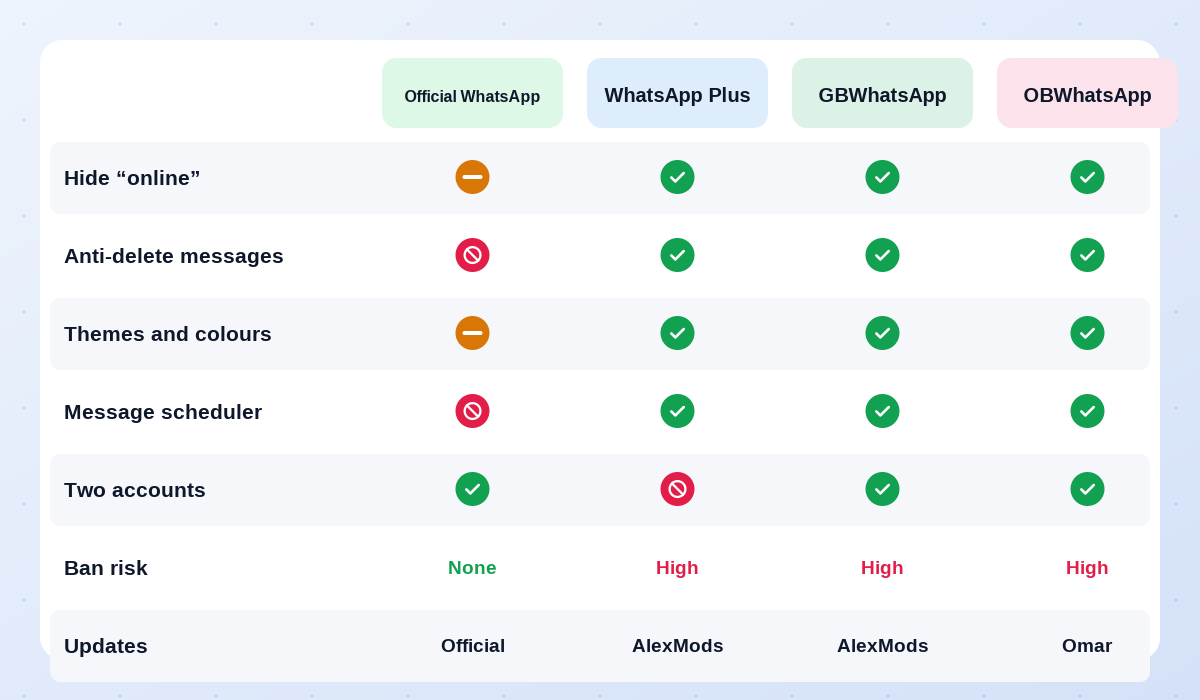
GB WhatsApp, WhatsApp Plus and OBWhatsApp are the three popular mods that are still actively maintained in 2026, and they share most features. The differences come down to design, multi-account support and developer. FMWhatsApp and YoWhatsApp are no longer part of this comparison: both are discontinued (see our FMWhatsApp and YoWhatsApp status pages).
| Feature | GB WhatsApp | WhatsApp Plus | OBWhatsApp |
|---|---|---|---|
| Status in 2026 | Active | Active | Active |
| Developer | AlexMods | AlexMods | Omar Al-Annabi |
| Default colour | Green | Blue | Colour variants |
| Ghost mode / privacy | ✔ | ✔ | ✔ |
| Anti-delete | ✔ | ✔ | ✔ |
| Theme library | ✔ | ✔ | ✔ |
| Dual account | ✔ | ✔ | ✔ (OB2, OB3) |
| DND mode | ✔ | ✔ | Varies |
| Auto reply and scheduler | ✔ | ✔ | Varies |
| On Google Play | ✘ | ✘ | ✘ |
| Ban risk | Yes | Yes | Yes |
Choose GB WhatsApp for the widest range of tweaks and easy dual-account use, WhatsApp Plus for its classic blue identity, and OBWhatsApp if you need several numbers on one phone or a strong Arabic interface. Our detailed WhatsApp mods comparison helps you pick by user profile and lists the discontinued mods with their status.
Is GB WhatsApp safe?
We will be straight with you: no one can promise GB WhatsApp is safe. The app itself is widely used, but it comes with risks you should weigh before installing.
- Bans: WhatsApp does not allow unofficial clients. Accounts using GB WhatsApp can be banned temporarily or, in repeat cases, permanently.
- Fake APKs: the biggest danger. Copies of GB WhatsApp bundled with spyware or aggressive adware circulate on many websites and in chat groups.
- Closed code: the mod is not open source and is not audited, so you are trusting an anonymous developer with your messages.
- No official support: if something goes wrong, WhatsApp support cannot help you with a mod.
Download only from a source you trust, scan the APK with an antivirus or an online scanner, check that the app asks only for normal WhatsApp permissions, keep local backups and use a secondary number if your main account is important. Never share your verification code. Our full safety guide explains how to check an APK step by step.
GB WhatsApp ban and anti-ban explained
If WhatsApp detects that you use GB WhatsApp, you may see a screen saying your account is temporarily banned, with a countdown timer. While it lasts, you cannot use that number. Temporary bans are usually a warning; users who return to mods after several warnings risk a permanent ban.
GB WhatsApp builds are advertised as “anti-ban”. This is the developer's claim: the build includes changes meant to make detection harder. In reality, WhatsApp keeps improving its detection, and anti-ban builds still get banned. Treat the label as a partial measure, not a guarantee.
What to do if your GB WhatsApp number is banned
- Stop trying to re-register repeatedly, which can extend the ban.
- Make a local backup if the app still lets you.
- Wait until the timer ends.
- Install official WhatsApp from Google Play, verify your number and restore your local backup.
- If the ban is permanent, you can request a review from the official app, but there is no guaranteed way to reverse it. Avoid any “unban” services.
Backup and transfer chats in GB WhatsApp
GB WhatsApp cannot use Google Drive backups, because those are linked to the official app. Instead, it saves local backups on your phone. Create one from Settings → Chats → Chat backup. The backup files are stored in a WhatsApp or GBWhatsApp folder in your internal storage (the exact location depends on your Android version and the build).

Move chats from WhatsApp to GB WhatsApp
- Create a local backup in official WhatsApp.
- Install GB WhatsApp (do not open it yet).
- If your GB build uses its own folder, copy the WhatsApp folder and rename it to the folder name GB expects.
- Open GB WhatsApp, verify the same number and tap Restore.
Move chats from GB WhatsApp back to WhatsApp
- Create a local backup in GB WhatsApp.
- If needed, rename the GBWhatsApp folder to WhatsApp, keeping the Databases and Media sub-folders.
- Uninstall GB WhatsApp and install official WhatsApp from Google Play.
- Verify your number and restore the local backup when prompted.
Copy your backup folder to a computer or cloud storage regularly, so you don't lose everything if your phone breaks. Our backup and restore guide explains folder names and common restore errors in detail.
GB WhatsApp on PC
There is no GB WhatsApp for Windows or Mac. To use it on a computer, you can run the APK in an Android emulator, which creates a virtual Android phone on your PC. Install the emulator, drag the APK into it and set up GB WhatsApp as you would on a phone. This needs a fairly powerful computer and a lot of RAM.
Alternatively, you can try linking WhatsApp Web or the desktop app to GB WhatsApp on your phone using the linked devices feature. It works with many builds, but GB-only features stay on the phone and linking can be unreliable. See our guide to WhatsApp mods on PC for both methods.
GB WhatsApp for iPhone
There is no real GB WhatsApp for iPhone. GB WhatsApp is an Android APK, and iPhones cannot install APK files. Pages offering a “GB WhatsApp iOS” download usually lead to fake apps, survey scams or risky profiles. If you use an iPhone, the official WhatsApp is the safe choice. If you use Android but love the iPhone look, try an iOS-style theme in GB. WhatsApp Aero, the mod once known for that look, has been withdrawn by its developer, so any Aero file you find now is an unauthorised clone. Read more in our WhatsApp mods for iPhone article.
GB WhatsApp pros and cons
- Huge set of privacy options including ghost mode
- Anti-delete for messages and statuses
- Built-in status downloader
- Easy dual account next to official WhatsApp
- DND mode, auto reply and message scheduler
- Large theme library, fonts and icon options
- Better media quality and bigger file limits
- Free and updated regularly
- Unofficial: not affiliated with WhatsApp or Meta
- Risk of temporary or permanent bans
- Many fake and infected copies online
- Manual updates only, no Google Play
- No Google Drive backup
- Not available for iPhone
- Features can break after WhatsApp server changes
GB WhatsApp troubleshooting
Most GB WhatsApp issues are easy to fix. These are the problems our readers report most often.
“App not installed” error
The APK may be incomplete, your storage may be full, or another GB build with a different signature is already installed. Download the file again, free up space and check that your phone runs Android 5.0+ or newer. If you are switching from another developer's build, back up, uninstall the old one and then install.
“This version is outdated” message
WhatsApp's servers have stopped accepting your build. Install the latest GB WhatsApp 18.80 over your current app. Tricks such as changing your phone's date are unreliable and may break other apps.
Verification code not received
Double-check the number and country code, make sure you have mobile signal, and wait for the timer to end before choosing “Call me”. Avoid requesting codes again and again, as that increases waiting times. An outdated build can also fail at verification, so update first.
Backup not found when restoring
GB WhatsApp only finds backups in the folder it expects. Check that the backup is in the correct WhatsApp or GBWhatsApp folder, was made with the same phone number, and that the Databases folder contains recent files. If your only backup is on Google Drive, restore it in official WhatsApp first, then make a local backup.
Media, stickers or voice notes not loading
Open Android Settings → Apps → GB WhatsApp → Permissions and allow access to photos, media and files. Clear the app's cache (not its data), check your connection and free up storage. If the problem started after a WhatsApp server change, a new GB update usually fixes it.
Notifications delayed or missing
Exclude GB WhatsApp from battery optimization, allow notifications for the app and make sure DND mode is turned off in GB Settings. Some phone brands also need the app to be allowed to auto-start.
GB WhatsApp keeps crashing
Update to the newest version first. If crashes continue, try switching back to the default theme, clear the cache, and as a last step back up, reinstall and restore your chats.
More WhatsApp mods and guides
GB WhatsApp is not the only option. WhatsApp Plus and OBWhatsApp are the other actively maintained mods. If you still use FMWhatsApp or YoWhatsApp, their status pages explain why they are discontinued and how to move your chats to GB.
 WhatsApp PlusActive v18.80The complete guide to WhatsApp Plus APK: latest version download, features, installation, updates, safety, backups and fixes for common problems.View and download →
 OBWhatsApp (Omar)Active v71OBWhatsApp by Omar Al-Annabi: numbered builds for multiple accounts, colour versions, features, install steps and safety advice.View and download →Themes & WallpapersHow to apply, import and create themes in GBWhatsApp and WhatsApp Plus, reuse old FM/Yo theme files, plus tips for wallpapers and dark themes.Read guide →
 Compare ModsWhatsApp Plus vs GBWhatsApp vs OBWhatsApp side by side, a recommendation for each type of user, and the status of discontinued mods.Read guide →
 FMWhatsAppDiscontinued v10.10FMWhatsApp is discontinued: no new builds from Fouad Mods since 10.10. Status, risks of fake APKs and the best active alternatives.View and download →
 YoWhatsAppDiscontinued v10.10YoWhatsApp (YoWA) is discontinued at 10.10. What happened, why new APKs are risky and which active mods to use instead.View and download →
GB WhatsApp FAQ
What is the latest version of GB WhatsApp?
Is GB WhatsApp free?
What does GB stand for in GB WhatsApp?
Is GB WhatsApp the same as GBWhatsApp Pro?
Can I get banned for using GB WhatsApp?
Is GB WhatsApp safe?
Can I use GB WhatsApp and WhatsApp on one phone?
How do I update GB WhatsApp without losing chats?
Why does GB WhatsApp say it is outdated?
Can I back up GB WhatsApp to Google Drive?
Is there GB WhatsApp for iPhone?
How do I get GB WhatsApp black or transparent?
Can others see that I use GB WhatsApp?
How do I move my chats from GB WhatsApp to official WhatsApp?
Does GB WhatsApp work on Android TV or tablets?
Conclusion: is GB WhatsApp worth it?
GB WhatsApp remains the go-to WhatsApp mod for many people, and it is easy to see why. Ghost mode, anti-delete, the status downloader, DND mode, auto reply, the scheduler, dual accounts and a huge theme library make it one of the most complete mods you can install. The current GBWhatsApp Pro builds are updated regularly to keep working with WhatsApp's servers.
But it is still an unofficial app. Bans are possible, fake APKs are everywhere, and you lose Google Drive backups and official support. Our verdict: GB WhatsApp is a good fit for Android users who understand these risks, download carefully, keep local backups and preferably use a second number. If your main account is critical, keep it on official WhatsApp and use GB for a secondary number.
Want to compare before deciding? Take a look at WhatsApp Plus or OBWhatsApp, the other two mods still maintained. FMWhatsApp and YoWhatsApp are discontinued, so we no longer recommend them. Otherwise, download the latest GB WhatsApp below.
APK file for Android · Free · No sign-up
Updated: · By WasaPlus editorial team